Ad shot list template: capture what the edit needs
Write down the shots you'll need for the edit. Include the main action, product close-ups and any extra footage you don't want to miss.
2 original production assignments
Production plans. Verify product facts and proposed copy before filming.
Bottle shoot with shared coverage
S1 / opening A
- Setup / camera
- Locked medium view at table height. Soft side light.
- Action and required detail
- Hand lifts the upright bottle. Keep its full silhouette visible.
- Props / location
- Verified bottle, hand, uncluttered surface.
- Sound / capture
- 5-second clean hold before and after the action.
- Delivery / review
- Deliver labelled takes S1. Creative lead selects the opening.
S2 / opening B
- Setup / camera
- Close view of cap and neck. Match the side light.
- Action and required detail
- Remove the cap without obscuring the opening.
- Props / location
- Actual cap and bottle. Spare clean surface.
- Sound / capture
- Capture natural cap handling plus a silent safety take.
- Delivery / review
- Deliver S2 separately from S1. Product owner checks the mechanism.
S3 / shared body
- Setup / camera
- Close view high enough to see the neck and stream.
- Action and required detail
- Fill the bottle using its intended method.
- Props / location
- Water source and dry backup bottle. Safe spill setup.
- Sound / capture
- Record continuous action and clean filling sound.
- Delivery / review
- Editor receives an uninterrupted take and a tighter detail take.
S4 / shared care
- Setup / camera
- Overhead view of verified removable parts.
- Action and required detail
- Place the bottle and cap so the care detail can be inspected.
- Props / location
- Actual parts and approved care instructions.
- Sound / capture
- Hold each view. No unsupported cleaning demonstration.
- Delivery / review
- Product owner approves the care cue before text is added.
S5 / shared close
- Setup / camera
- Medium product view with clear space for text.
- Action and required detail
- Bottle beside own bag. Keep the destination area unobstructed.
- Props / location
- Bottle, own bag and approved destination copy.
- Sound / capture
- 10-second hold gives the editor closing options.
- Delivery / review
- Deliver clean footage without baked-in text. Check both export shapes.
Assignment assumptions
Brief: make 2 15-second ads for a refillable water bottle. This plan assumes the cap comes off and the bottle can be washed. Check both with your product owner. Choose opening A or B, then follow the 3 shared beats. We wrote this as a plan, without campaign results.
Team review and variant handoff
- Creative lead approves the product facts and both opening ideas before the shoot.
- Capture each opening separately. Editor builds BOTTLE-A-V1 and BOTTLE-B-V1 from the same shared body and closing shot.
- Compose the shoot for a 9:16 export and check a separate 4:5 version. Reframe your own footage where needed instead of cutting off the product or required copy.
- Compare the openings with the same audience, placement and measurement window. Use your own baseline and decision rule. Record the export version, owner and review date.
Organizer shoot with packing coverage
S1 / opening A
- Setup / camera
- Locked front view of the hanging organizer.
- Action and required detail
- Show its full open layout and the hand pointing to compartments.
- Props / location
- Own organizer, stable hanging support, neutral set.
- Sound / capture
- Record room tone and a clean hold.
- Delivery / review
- Creative lead checks layout visibility before packing starts.
S2 / opening B
- Setup / camera
- Overhead view of closed organizer and travel items.
- Action and required detail
- Bring the organizer into frame beside the items.
- Props / location
- Only items approved for the packing demonstration.
- Sound / capture
- Capture natural handling without dialogue.
- Delivery / review
- Label as alternate opening. Do not substitute for S1 coverage.
S3 / shared pack
- Setup / camera
- Front view matching S1. Add a close safety camera if available.
- Action and required detail
- Pack 3 items into separate compartments in one continuous take.
- Props / location
- Actual fitting items and a duplicate set for resets.
- Sound / capture
- Record packing sound and pause between placements.
- Delivery / review
- Shoot lead reviews the whole action before changing setup.
S4 / shared detail
- Setup / camera
- Close view of one fastening with the item still visible.
- Action and required detail
- Close and reopen the compartment.
- Props / location
- Actual fastening and packed item.
- Sound / capture
- Keep the hand clear of the detail. Capture a second angle.
- Delivery / review
- Product owner checks that the demonstration matches normal use.
S5 / shared close
- Setup / camera
- Return to the full hanging view with room for text.
- Action and required detail
- Hold the finished layout and keep the destination area clear.
- Props / location
- Packed organizer and approved closing copy.
- Sound / capture
- 10-second clean hold. Record a wider safety take.
- Delivery / review
- Editor checks all intended crops and creative lead approves the exports.
Assignment assumptions
Brief: make 2 20-second ads for a travel organizer. This plan assumes it hangs open and has separate compartments. Check those features with your product owner. Choose opening A or B, then follow the 3 shared beats. Use your own product, setting, copy and footage. We haven’t measured results for this plan.
Team review and variant handoff
- Product owner confirms the actual compartment layout, hanging method and items the organizer can hold.
- Shoot lead labels the 2 openings separately. Editor builds BAG-A-V1 and BAG-B-V1 with identical packing and closing beats.
- Capture a wide safety take and a close detail take. Check product visibility and text in every intended export shape.
- Have the creative lead review the finished cut before launch. Keep the offer the same when comparing the openings, then review your own test results.
Use the shot list to tell the crew what to film. Group the setups, note the action and product detail, and label the takes so the editor can find them.
Blank and completed downloads
Open the CSV files in your spreadsheet app. Read the worksheet in a public Google Doc and make your own copy to edit.
Use the shot list in Word or a spreadsheet
Use the CSV when you want to sort setups, and the Word document when you want to add shoot notes or print a working sheet. Both carry the same 6 planning fields. The original bottle example shows how the alternate openings and shared coverage become separate shots.
- Agree the intended sequence first. Then group capture by setup, location and props while retaining the shot IDs, so filming order does not become editing order by accident.
- For every setup, record the action, the detail that must remain visible, sound coverage and a clean hold. Name who reviews that take before the camera moves.
- Keep the CSV and worksheet alongside the Word copy. Add your product details and version number to your working file. Before clearing the set, check the footage against your shot list. The example cannot confirm that you captured every shot.
Use it in the production handoff
Use this after the sequence is agreed and before the shoot. It helps a team collect the coverage for several edits without guessing which angle or take the editor needs.
- Give every shot a stable ID and name the edit it supports.
- Group camera and lighting setups so the crew can work efficiently. A shot ID does not dictate shoot order.
- List the product detail, props and clean audio the editor needs. Record safety takes and alternate openings separately.
- Label footage by shot and take. Assign someone to review coverage before the set is cleared.
Reference a view, then make your own work
These existing ad references help discuss framing and product visibility. The completed production assignments above are original plans, not reconstructions of these advertisers’ scripts or shoots.
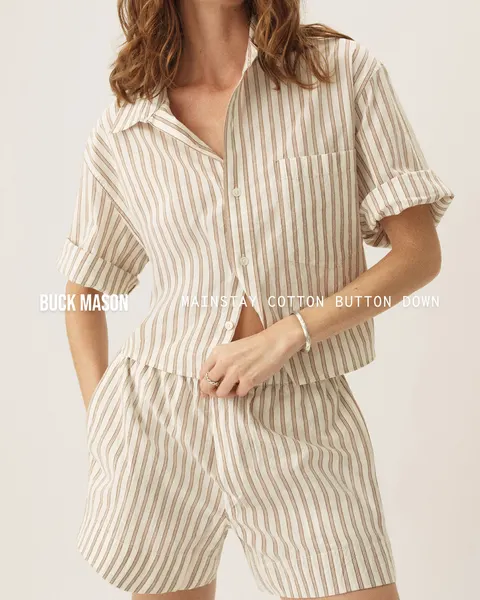
A waist-level crop keeps the striped shirt, sleeve and fastening visible.
What to look for: Which observable framing choice belongs in our own brief?
Try this: Describe the view you need and create your own imagery. Public creative does not establish advertiser results or permission to reuse it.
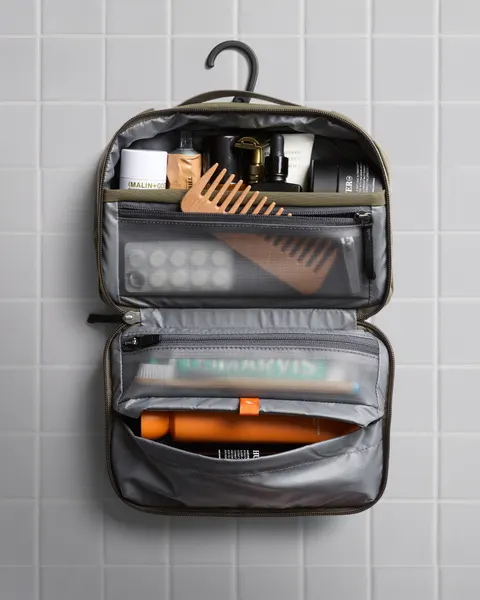
An open hanging toiletry bag makes the separate compartments and contents visible.
What to look for: Which observable framing choice belongs in our own brief?
Try this: Describe the view you need and create your own imagery. Public creative does not establish advertiser results or permission to reuse it.
Make the product feature visible
Compare camera-angle planning views before writing the shot list.
Keep the related documents aligned
A storyboard plans the frames, a shot list plans the capture and a script aligns words with action. Keep the same variant IDs and review owners across them.
Bring the reference set to your team
We help you collect ad references on the Infinity Board. Pro lets you save a selected set to a named board and share it with your team on desktop. Keep your script, storyboard and production files in the tools your team uses.
Plan the opening and its review
Planning notes: Shoot order and edit order are different
Shoot order and edit order are different
Group the bottle coverage by camera and lighting setup, then label each take with its shot ID. The editor assembles the chosen opening and shared footage in story order.
- Table setup · S1
- Locked medium view, soft side light. Capture the upright bottle lift for Opening A.
- Close setup · S2
- Cap and neck view with matched light. Capture Opening B separately.
- Shared coverage
- Capture filling and verified parts. Label shots and takes. Confirm coverage before clearing the set.