Video ad examples: follow the product from opening to action
Watch what happens after the first shot. How does the ad introduce the product, show it in use and give people a next step?
Compare different ways to build a video ad
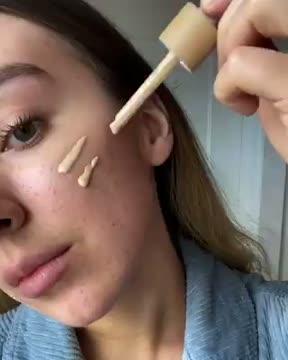
Show the action before naming the product
ILIA starts with application and blending, then identifies the product at the end with a shopping prompt and website. That lets the action introduce the ad before the product card names it. The preview here is only a short, silent opening.
What to notice: A dropper applies tinted liquid to a cheek.
Product: Application and blending make the use visible. They do not substantiate wear or skin benefits.
Offer: No price or discount is established by this visual study.
Next step: The retained ending contains a shop/product card and domain.
Try this: For your own cosmetic, film the application clearly and end with the exact product and matching destination.
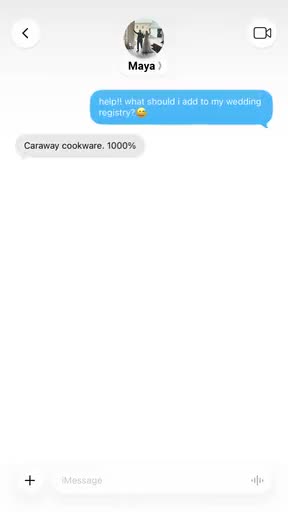
Let a question carry a text-only sequence
Caraway turns a wedding-registry question into a message exchange. A cookware recommendation leads to a review-count claim and product link. The conversation carries the explanation without a person or cooking demonstration. We haven’t verified the review count.
What to notice: A message asks what to add to a wedding registry.
Product: The sequence provides a recommendation and product image. Its review-count statement is not independently verified here.
Offer: No price or discount is shown.
Next step: A cookware product-link preview gives the conversation a destination cue.
Try this: For a clearly labelled scripted concept, answer one genuine product-choice question with verified facts and an accurate product page.
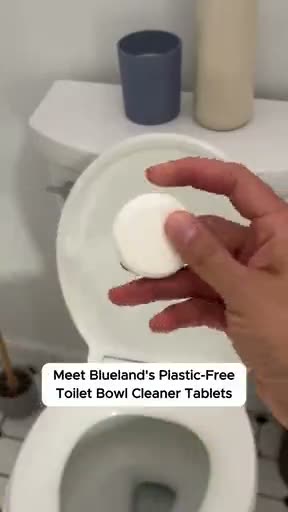
Move from an aspiration to a visible task
Blueland starts with bathroom imagery and spa-scent text, then shows the tablet being dropped, fizzing, brushed and flushed. The closing line returns to the bathroom promise. Notice how the demonstration gives the opening a task to follow. The footage doesn’t verify fragrance or cleaning results.
What to notice: Bathroom imagery and text introduce a spa-scent aspiration.
Product: The tablet-to-bowl, fizz, brush and flush sequence shows handling. It does not independently verify fragrance or cleaning efficacy.
Offer: No price or discount is shown.
Next step: Closing text invites viewers to upgrade their bathroom with Blueland.
Try this: For your own household product, connect a relevant setting to the actual instructed steps. Verify any sensory or efficacy statement separately.
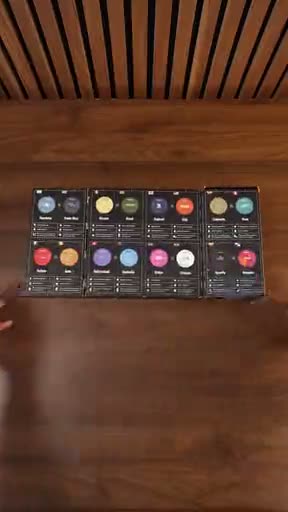
Give a longer demonstration a recurring structure
Cometeer opens on a multi-coffee box and a mug sip, introduces a World Mug Champion bracket, then returns to capsule views, preparation, cups and tasting. Writing on the bracket and a thumbs-up bring the exercise to a close.
What to notice: An opened multi-coffee box precedes a person taking a sip.
Product: Products, preparation and tasting recur around the bracket. No independent taste ranking is established.
Offer: No readable price or discount is established.
Next step: The visible close resolves the bracket exercise. No explicit shopping CTA is established.
Try this: Build an original comparison around your own declared criteria and real observations. Do not present a staged preference as a universal ranking.
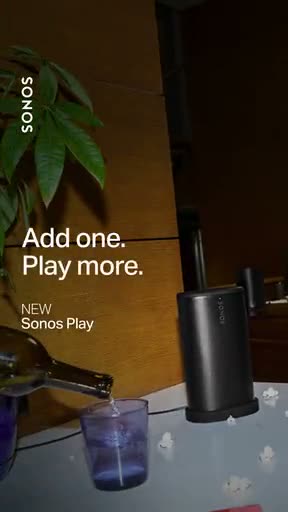
Keep the product in view as the words arrive
Sonos keeps the product in view while the words build to Add one. Play more. and NEW Sonos Play. The shot stays simple so you can read the message beside it.
What to notice: The product is already visible before the fuller text appears.
Product: The whole speaker and room context identify the object. A silent view cannot demonstrate sound quality.
Offer: NEW labels the product. It is not a price or discount.
Next step: No explicit shopping button is visible in the retained sequence.
Try this: For a product introduction, reserve readable text space beside a whole product view and use only facts your own product supports.
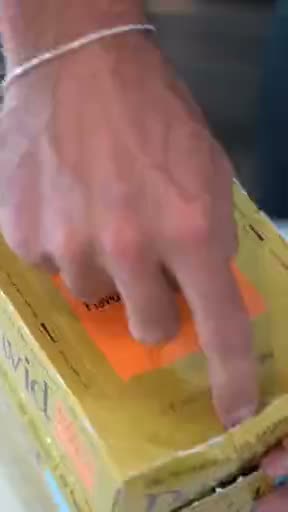
Reveal the package, then the product inside
David shows the product being unpacked before someone tastes it. The boxes lead to the wrapper, then the bar and its texture. That gives the viewer a closer look before the person takes over.
What to notice: David shows stacked boxes.
Product: Opening the carton and wrapper reveals the actual bar. Tasting is visible but flavour approval is not established.
Offer: No readable promotional offer is established.
Next step: No explicit readable shopping CTA is established.
Try this: For your own packaged food, show package, opening and product clearly. Use truthful first-person words only after real use.
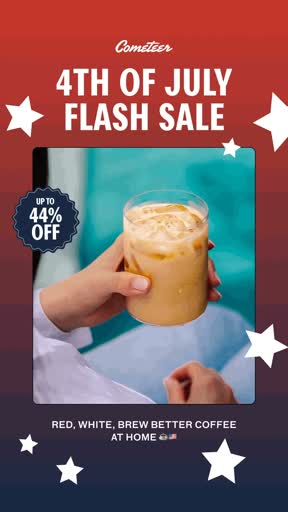
Hold the offer while the photographs change
Cometeer’s complete retained silent loop changes drink and preparation photographs while sale text and a discount badge remain visible. Its year and offer validity are unrecorded.
What to notice: A product photograph and sale message appear together.
Product: Changing photographs show drink and preparation contexts.
Offer: A sale headline and discount badge persist. No current validity is claimed.
Next step: No additional closing action is established by this loop.
Try this: Use your own valid offer and clear terms. Review product imagery and promotional copy as separate parts of the edit.
Look past the first shot. What does the next shot explain, and where does the ending take you? These examples use product actions, conversations and reveals in different ways. Use the comparison to plan your own sequence.
Review the explanation between the opening and the close
An opening can make you curious and still leave the product unclear. Watch for when you can identify it, understand what it does and connect it to the CTA. If a step is missing, put that shot in the brief.
TikTok’s hook, body and close structure is a useful planning lens. Apply it to the complete source when available. A 6-second silent snippet can support a framing observation, but it cannot supply the missing speech, full sequence or ending.
Try it in your next brief
Outline an original edit in 3 sentences: the question the opening raises, the action that answers it and the next step the close offers. If the middle sentence describes a benefit you cannot show or support, revise the assignment before choosing transitions.
Further reading: TikTok’s creative planning guidance
Videos on marketing: use a lesson for a different job from an ad reference
An ad example shows an execution. A marketing lesson explains a method or platform workflow. Start by choosing which you need. If the question is how a creator presents a product, study the real sequences on this page. If the question is how to assemble assets in an advertising tool, use the publisher’s own tutorial and current documentation.
Google Ads’ Video creation in Google Ads tutorial is an official lesson about making a video from existing assets. The linked YouTube video was playable when checked on October 18, 2026 and shows a duration of 4:38. It is an older interface walkthrough, not proof that every menu or requirement is unchanged today. We verified its publisher, title and playback; we have not produced a full speech transcript or adopted its promotional promises.
Study assignment: before opening the lesson, list the approved images, product facts, destination and intended placement. While watching, note the inputs the workflow asks for and the checks needed before export. Compare the result with the original brief: is the product recognizable, does the sequence answer the question, and are the words supported? Use current help to verify a control that differs from the older video.
For testing rather than assembly, Google’s written video-experiment documentation explains basic and custom paths with eligibility limits. Read it beside the current account settings. Viewing a lesson does not create an experiment or verify a campaign outcome. This short route into advertising education is not a complete course covering all of marketing.
Choose the structure around the information
ILIA uses application to show what happens. Caraway uses a conversation to answer a question. Sonos leaves room for a short line beside the product. Choose the structure around what someone needs to understand, then decide which shots you need.
Separate product evidence, claims and offers
A visible task can explain handling without proving a benefit. Blueland shows steps. David reveals a bar. Cometeer uses a bracket to organize tasting. Keep those observations separate from efficacy, taste and advertiser claims. The short Cometeer sale loop adds another distinction: an offer can remain fixed while product photographs change.
Read the close even when there is no button
ILIA ends with the product and shopping cues. Caraway gives the conversation a product link. Blueland closes with an invitation. We didn’t find an explicit shopping button in the Sonos, David or Cometeer bracket sequences. You don’t need to copy their ending. Choose a CTA that takes someone to the right next step for your product.
Make the comparison useful on a shoot
For an adjustable desk lamp, compare a switch-first opening with a whole-desk opening. Keep the same switch operation, shade adjustment and closing view in both edits. Ask the producer to verify the sample and capture complete actions. Ask the editor for a whole export. Choose timing after the action is known.
Use the worksheet
The completed example separates what we can see in the ads from our own plan. Use the blank worksheet for your product details, supporting sources and the people reviewing the work.
Start with the blank worksheet, or read the filled-in example to see how to use it. You can copy either one.
Sources and review method
We wrote these notes and briefs from the reference files. The previews here are short and silent. When a note uses a longer video, we say so in the caption. Our suggestions for your own ad are separate from what the advertiser made.
We added these review notes on . That isn’t the date the ad ran or the file was collected. We don’t have the full spoken script, targeting, spend or results unless a source below provides them. A public ad also doesn’t give you permission to reuse it.
Use the IDs below to look up the references in the Meta Ad Library. We haven’t rechecked whether each live record is still available or matches the file shown here. A Meta library ID doesn’t confirm TikTok placement. You can still study the previews on this page.