Food ad examples: show the product, serving and offer
What do you want people to notice about the food? Compare product close-ups, serving shots and offers, then plan the views you need.
Name what the picture lets someone inspect
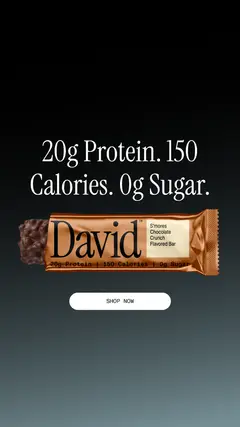
A nutrition headline above the product
The David image puts the product beneath the advertiser’s protein, calorie and sugar statements, with a Shop now button below. Those are advertiser statements, not independently verified nutrition facts.
What to look for: Does the product remain recognizable while the headline is read?
Try this: Give your own supported fact, product and next action distinct space. Check the actual product label and offer.
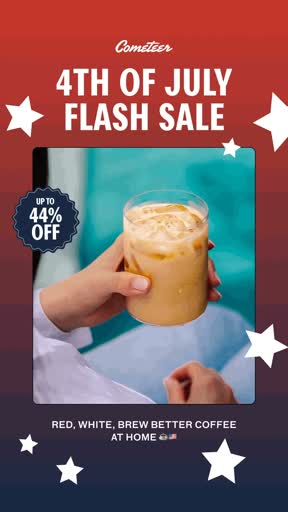
Keep the offer while changing the product view
This complete retained 2.5-second silent loop has 5 frames: one held glass, preparation beside boxes, the same photograph with changed stars, 2 glasses, then a person holding a drink. The sale headline and discount badge persist. The year and offer validity are unrecorded.
What to look for: What changes in the photograph while the message stays fixed?
Try this: Separate product context from offer copy. Use your own approved offer and actual drink or food preparation.
Look at how food and drink ads show the product, serving and offer, then plan the shots for your own product.
Name what the picture lets someone inspect
David’s image identifies the product. Cometeer adds preparation and serving views while keeping the offer visible. Decide what your own ad needs to show: the product, texture, portion or a step in making it. The scene alone won’t prove taste, a health benefit or a sale.
Keep product facts and offer copy separate
David uses nutrition copy, while Cometeer holds a sale message over changing photos. Both give the product view another job. Before using a similar layout, check your own label, offer terms and destination. We haven’t verified these nutrition claims or a current discount, and holiday styling doesn’t tell us the sale year.
Decide what needs movement
A single product view can identify the item. Preparation or retrieval may need a sequence. In the coffee file, changing photographs adds context while the headline stays fixed. In your own shoot, keep ingredient, portion and appearance truthful, and record production changes that materially affect depiction. Avoid treating a styled image as evidence of a physiological benefit.
An original food shoot assignment
For this snack brief, plan 3 shots: the whole package, the opened snack close up and a normal serving. Use the same product in all 3. The product, ingredient and offer facts are placeholders to verify against your own sample, not claims supplied by this guide. End with a simple action that opens the same product information.
Review the complete message before testing
Check image, headline, label, price/discount and destination together. Assign the product owner to factual review and the editor to whole-frame/caption continuity. Choose an opening-only comparison with the same body and offer when that is the question. Record actual testing data before calling either depiction effective.
What a restaurant ad needs to tell a nearby customer
A restaurant ad needs to connect the food with a real way to order or visit. Choose the job first: book a table, collect an order or get delivery. A close-up of a dish can help someone recognize what is available, but it cannot answer where the restaurant is, when the kitchen is open or whether the pictured meal is available through the linked service.
For a real reference, compare the app-offer and delivery messages on McDonald’s US homepage, checked October 18, 2026. Its fries promotion names a purchase condition and an app action. The accompanying terms limit participation and exclude delivery. A separate delivery message leads to an ordering route. These are website promotions, not evidence of a paid-social placement or campaign results. The useful distinction is that the same restaurant can ask for different actions, each with its own conditions. Read the linked source for current details rather than treating this dated observation as an available offer.
An original restaurant ad brief: weekday lunch for pickup
This cafe brief asks customers to collect a weekday lunch. Plan 3 shots: the complete meal as served, the actual pickup counter and the meal being handed over. Use the real portion in the first shot and the same items in the handover. The example does not supply a price, opening hours or discount. The restaurant owner must confirm those details before the writer adds them.
Give the writer this original direction: name the meal, the pickup location and the ordering action. A draft line could read “Choose your lunch. Order for pickup.” Replace it if the restaurant does not support that ordering route. Put the location and confirmed collection times beside the CTA, then link to the same meal at the correct branch. If the destination only takes table bookings, change the ad’s job instead of sending pickup customers there.
Review the restaurant ad from food to collection
Check the final image against the menu and actual serving. Confirm the items included, any price conditions and whether the pictured extras cost more. Open the ordering destination on a phone, choose the correct branch and check whether the meal and pickup option are available. Do not place a test order without permission. A page opening successfully does not establish that checkout or kitchen fulfillment works.
For the cafe brief, keep 1 opening that shows the whole meal and another that starts with the pickup handover. Keep the meal, message and destination the same if the opening is what you want to compare. Decide who will record completed pickup orders and the test dates before launch. A good-looking food shot, ad click or busy dining-room photograph does not prove the ad caused a sale. Use the food worksheet below for the product and offer facts, with these extra restaurant notes beside it.
Use the worksheet
The completed example separates what we can see in the ads from our own plan. Use the blank worksheet for your product details, supporting sources and the people reviewing the work.
Start with the blank worksheet, or read the filled-in example to see how to use it. You can copy either one.