Ad mood board examples: collect a direction you can explain
Save references that help explain the shoot you want. Add a note about what to take from each image so the team knows why it's there.
Bring the product into a familiar relationship
Production question: How close should the camera be for our small product to remain recognizable?
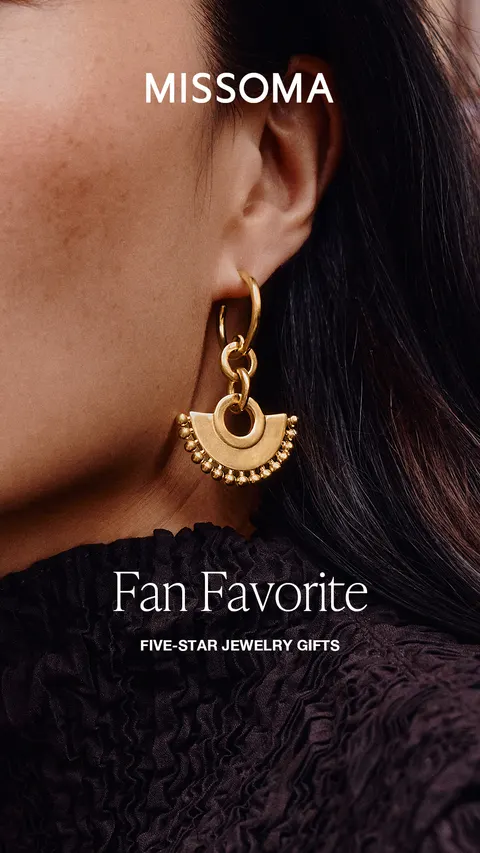
Earring beside a face
The cropped face and knit give Missoma’s earring a wearing context.
What to look for: Which familiar relationship helps explain our own piece?
Try this: Use a wearing reference to discuss distance. Verify scale with the real product.
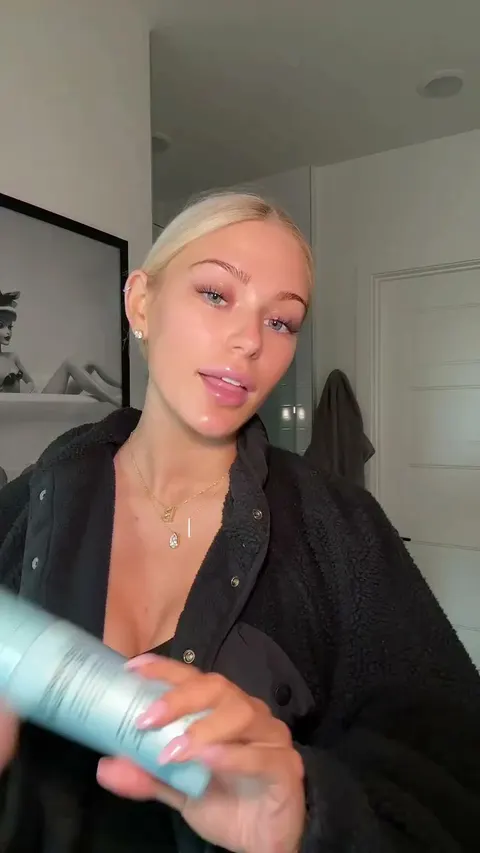
Product and person share the view
- The person brings the product closer to the camera.
- Notice when the product becomes easy to see.
- Ask for a clear close-up of your own product.
Read the notes
In the 6-second silent INNBeauty snippet, a creator gestures with a product and brings it close to the camera.
What to look for: When does the product become identifiable in our own shot?
Try this: Specify hand position and camera distance. The snippet does not establish the full spoken message or advertiser results.
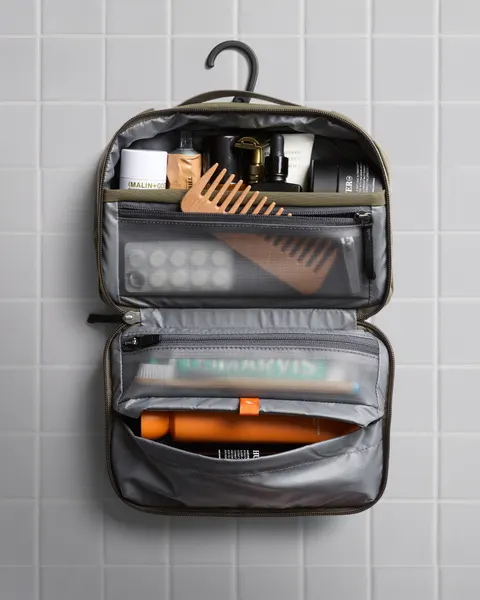
Opening makes the layout visible
Bellroy’s open toiletry bag puts its compartments and contents in view.
What to look for: Does our product need an opening view to explain its layout?
Try this: Ask for the view that exposes the required detail, then verify it with your own product.
Choose references that help show size or use: the product in a hand, being worn or opened up. Skip images that only repeat the same outline.
Decision for our original assignment
For our shoot, get a close-up and a wider view that shows the product being held or used. Check both with the real product before settling on the framing.
Creative lead records the detail each view must show. Shoot lead captures both distances. Editor keeps the product visible in every export shape.
3 original reference groups for choosing product views, garment coverage and text space. These are teaching examples, not advertiser campaign plans.
Give every reference a sentence the team can use
A mood board becomes useful when someone else can explain the direction from its captions. Instead of ‘love this’, name the visible choice: the product stays large, the background stays quiet, or the hand movement reveals the mechanism.
Production studio TRG describes mood boards as a way to align a project before a set is built or a product is styled. For an ad brief, make that alignment concrete: say which choice belongs in your own production and which reference details should stay behind.
Try it in your next brief
Under each selected reference, finish this sentence: ‘Use this to discuss ___, then show our product by ___.’ Remove an image if it adds no distinct decision. Your finished board should explain the capture, lighting or framing question without a live presentation.
Further reading: TRG on mood boards before production
Cover a garment without relying on one crop
Production question: Which views does the editor need to show our garment's full shape and its important details?
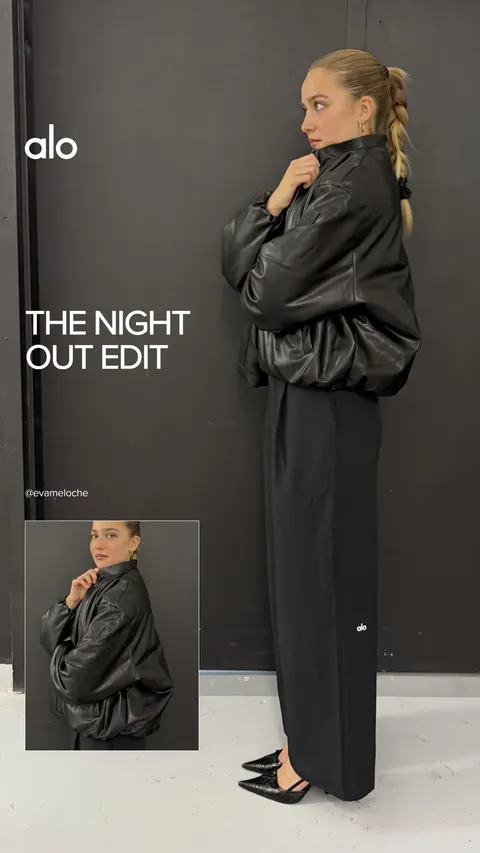
Full view with an inset
Alo keeps a full-length outfit as the main view and places a smaller outfit view beside it.
What to look for: Which view tells the main product story?
Try this: Keep a clear main view and give every additional view a specific job.
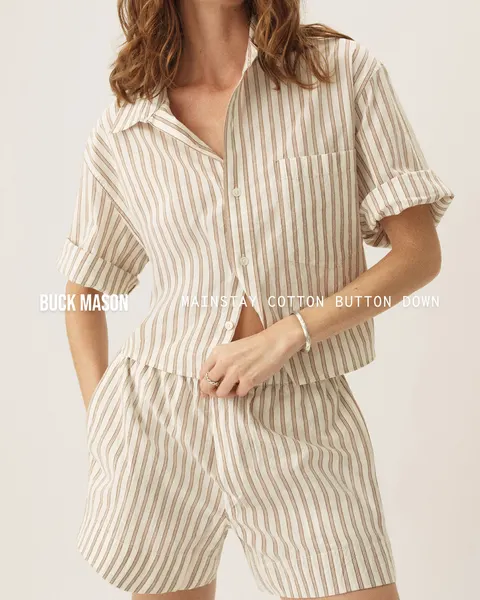
Sleeve and fastening detail
Buck Mason’s closer crop makes the striped sleeve and fastening visible.
What to look for: Which details disappear in a full view?
Try this: Capture those details separately so the editor has usable coverage.
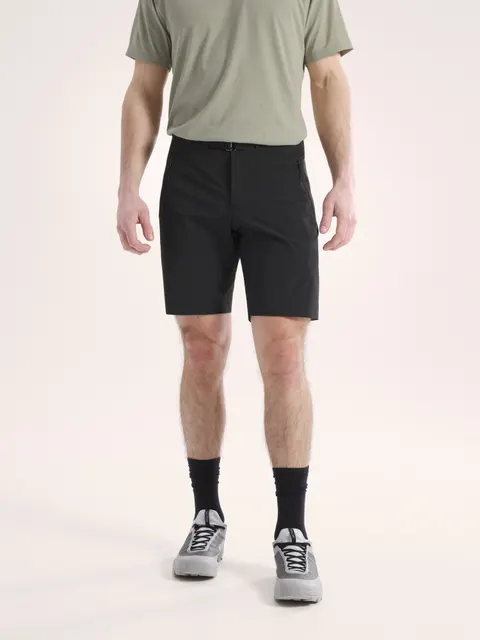
Clothing relationships in one crop
Arc’teryx keeps the T-shirt, shorts and shoes together while cropping the head.
What to look for: What must remain inside our intended frame?
Try this: Write the required coverage into the shot list rather than discovering it during export.
Include a wider wearing view and contrasting detail views. Keep these as shot references, not evidence of fit across bodies or sizes.
Decision for our original assignment
For our own garment, capture a full view, a fastening or sleeve detail and a separate movement take. Choose the required details with the product owner before the shoot.
Shoot lead labels coverage by view and garment detail. Editor records which crop supports each export. Creative lead reviews the full garment before approving the cut.
Leave room for the statement
Production question: How can our approved line and product both remain readable?
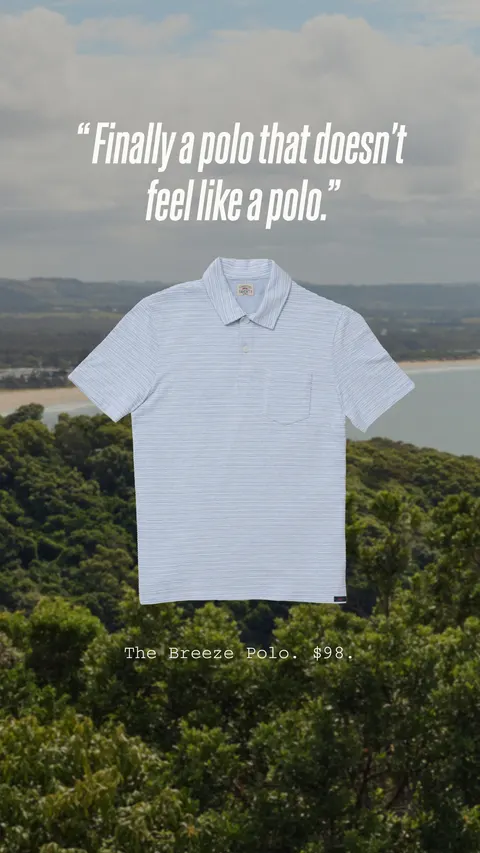
Quote above the garment
Faherty’s short quote sits above the polo instead of competing with it in the same area.
What to look for: Where can our approved copy stay readable?
Try this: Reserve text space for the words the brief actually requires.
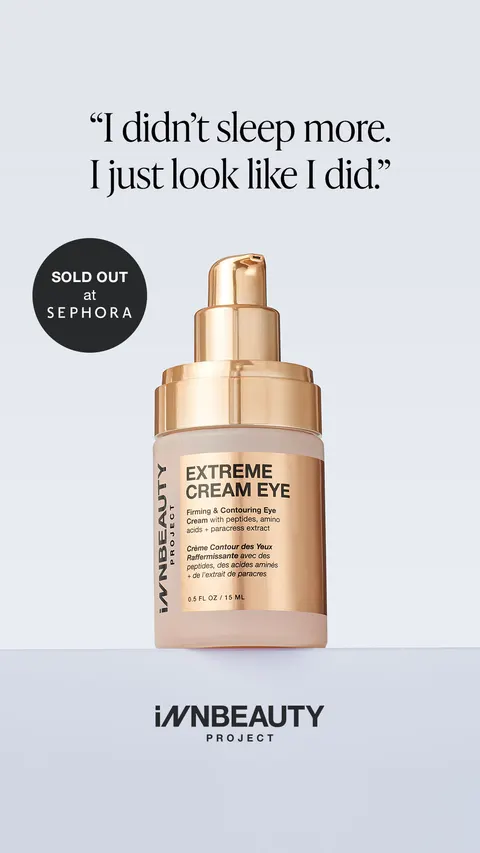
Quote and availability cue
INNBeauty separates its 2-line quote, product and availability badge.
What to look for: Which cue needs its own space?
Try this: Agree the information order, then test it with your own copy.
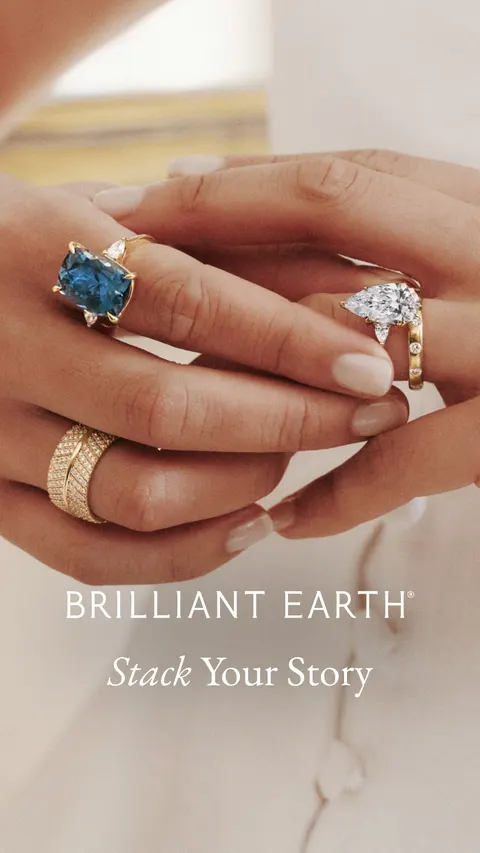
A line attached to a styling relationship
Brilliant Earth’s Stack Your Story line accompanies rings worn together on a hand.
What to look for: Does our headline describe what the image makes visible?
Try this: Keep the statement specific to your own idea and verify any material claim separately.
Choose references that leave space for both the product and the words. Compare where the quote, availability note or headline sits instead of saving the same layout repeatedly.
Decision for our original assignment
For our original static concept, agree one lead statement, 1 product view and one necessary destination cue. Check the actual words in the planned layout before photographing the product.
Creative lead signs off the statement and evidence. Designer tests text at final size. Product owner checks the product depiction and description in the finished image.
Make a fashion mood board into a shoot brief
The garment board above contrasts Alo’s full view and inset, Buck Mason’s closer garment detail and Arc’teryx’s clothing relationships. Use those existing references to agree the coverage for your own fashion ad. A fashion mood board needs a decision about the garment and view, not just a collection with a shared aesthetic.
- Write 1 question: which full view and detail view does the editor need? Keep the source, visible choice and limitation beside each selected reference.
- Turn the contrast into an original assignment: one full garment take, a separate approved detail and a movement take if your product question needs it. These are proposed shots. The reference images do not verify fit, fabric or performance.
- If you start with a Pinterest mood board, retain the original source and check what you may use. We do not import Pinterest accounts or turn another person’s board into a cleared production asset. Use the worksheet to carry your own decisions into the brief.
Create an ad mood board from an editable layout
Our original SVG gives you three reference spaces, source and date fields, observation notes, an original choice to try and a shoot assignment. Download it, open it in an SVG-capable editor and replace the placeholders with references you are allowed to include. Keep the source beside each image. Save your working SVG, then export a review image or PDF from your editor.
Choose a whole-product reference, a detail reference and one useful contrast around the same production question. Describe the choice you want to make in your own shoot; do not treat another advertiser’s image as your production asset. The examples below show how to make those notes concrete.
This is a portable layout for your own editor. Barry’s saved-reference boards use the existing desktop workflow; this page does not add a hosted image composer or automatic import service.
How to make a Pinterest mood board for an ad shoot
Use a Pinterest board to collect references, then give each saved Pin a job in the shoot. A board of attractive pictures still leaves the photographer guessing. Start with 1 question, such as how to show the inside of a bag, and group the references around the views you need.
- Sign in to Pinterest and create a board. Name it for the product and shoot question so the team can recognize it later. Pinterest also lets you create a board while saving a Pin.
- Choose the board’s visibility before collecting project material. Pinterest’s private-board guidance says only you and invited people can see a private board. Check the setting in your account. An invite gives someone access to the board, so review who needs to be included.
- Save a small set of references with a useful difference between them. Open each Pin’s destination and record the original source in your brief. A saved image can lose the context that explains who made it or what it shows.
- Add sections for the production decisions. On desktop, open the board, add a Section and name it. Use Organize to select Pins and move them into the section. Pinterest’s mobile controls differ, so use its linked instructions for your device.
- Choose the reference you will actually use for each shot. Write the visible choice, what your own product needs and what the photographer should avoid. Share the board with the written brief and review the access before the shoot.
A worked board plan: show the inside of a travel bag
For an original practice brief, name the board “Travel bag — show what goes where”. Make 3 sections: whole open view, useful details and product in use. Use the Bellroy reference in our static-ad guide to discuss what an open product view reveals. Find a contrasting view where the contents are harder to identify, then explain the difference in your own notes. This is a proposed research exercise, not a Pinterest board we have created.
Beside the chosen whole view, write: “Photograph our bag open with the actual items inside. Keep the complete arrangement visible.” For the detail section, name the specific opening or fastening the photographer needs to show. For the use section, choose the action the shot must explain. The product owner checks that the real bag fits those items before anyone makes a capacity claim.
Check the board before sending it
A teammate should be able to name the shoot question, identify the selected reference for each shot and explain what will be different in your own version. Remove Pins that repeat a view without adding a decision. Keep source links and permission checks in the brief. Saving a Pin or making a board private does not give you permission to reuse the image in an ad.
Pinterest instructions checked October 18, 2026. These are documented platform steps, not a test inside your account. We do not offer a Pinterest integration or create a Pinterest board from this page.
Make a mood board the team can act on
- Name one production question before collecting references.
- Choose a reference for each useful choice and include a contrast. Remove repeated views that add no new information.
- Annotate the visible choice and the question it raises. Keep advertiser claims and unknown results separate from your interpretation.
- Write down what you want to make, the shots you need, who’s making them and when you’ll review them. Shoot your own material, then check the finished work.
Collect references in Barry
Use the Infinity Board to explore ads and compare visual choices. With Pro, save a selected set to a named board and share it alongside the brief on desktop. Keep the team’s production notes and source-rights checks in its own documents. A public reference is not permission to reuse an advertiser’s creative.
Planning notes: An original direction board for a bottle shoot
An original direction board for a bottle shoot
We made this plan to answer 1 question: how can we clearly show our bottle being opened and refilled? These are directions for our own shoot, separate from the advertiser references.
- Useful common choice
- Close view of our cap and neck: leave room for the opening action.
- Contrast
- Full bottle view: preserves silhouette but makes the mechanism smaller.
- For our shoot
- Capture both views under the same light. Product owner checks the cap and filling method.