What is a VSL? Plan a video sales letter and its evidence
A video sales letter explains why someone might buy a product. Plan the message alongside the demonstration and the next step you want them to take.
Identify product and action cues in a single static frame
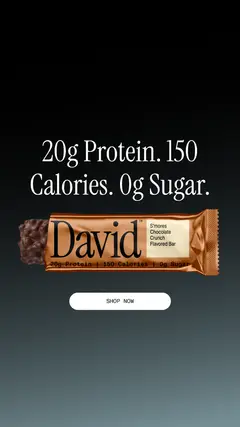
A clear still is a planning reference, not a verified VSL
David puts a nutrition headline, the product and a shopping action together. Use that as a layout reference when planning your message and next step. The still isn't a verified VSL and doesn't supply a spoken script or sales result.
What to look for: What must a video demonstrate beyond the headline and pack shot?
Try this: Pair every material line of your own sales script with an appropriate action or source.
A VSL is a video sales letter. It explains the product or offer and gives someone a reason to take the next step. Build the script around the buying question, then pair the words with footage that helps answer it. Keep the landing page part of the same explanation.
Define the purpose before choosing a style
HubSpot defines a VSL as a video that pitches a product or service to a prospect. Wyzowl describes a flexible format that can use a presenter, animation or screen recording. Its sales purpose matters more than visual style, runtime or an on-camera presenter.
A demonstration explains use. A testimonial supplies someone’s account. An explainer introduces an idea. A VSL can connect those components to an offer and action.
Write the audience problem and the proposed change
Name one situation the offer addresses. A cable-organizer kit might address loose charging cables beside a desk. That gives the script something concrete to demonstrate. “Make your life better” is too broad to guide the footage or tell a reviewer whether the explanation is complete.
Show the change the product can actually make. For the cable kit, that means bringing the charging cables together beside the desk. It doesn't mean a perfectly organized home. Check that the before-and-after shots show the same cables and space.
Explain the product through a visible mechanism
After the opening, give the viewer enough information to understand what the product does. For the kit, show a wrap being opened, placed around a cable and closed. Keep the important movement visible. A stack of product close-ups cannot replace an explanation when the mechanism is unfamiliar.
The David still puts the product and shopping button together. Use it to think about where each belongs in your frame, then write the spoken explanation your video needs. The still isn't a verified VSL and doesn't supply that script.
Choose evidence that answers a real objection
List the questions that could prevent the intended decision. Will the wrap fit this cable? What parts come with the kit? Does it need tools? Answer them with an actual demonstration, verified specification or clearly attributed customer evidence. Choose proof because it addresses the question, not because it looks impressive.
Keep the conditions visible in a comparison. If the script shows a tidier desk, use the same desk and cables rather than quietly removing items between shots. A testimonial can describe an individual’s experience, but it should not be turned into a universal product claim.
Make the offer and action understandable
The offer tells the viewer what they can get and the relevant terms. The action tells them how to continue. For a product with compatibility questions, comparing the included parts or checking the size guide may be the useful next step. For another offer, booking a conversation may be appropriate.
Do not add a countdown, bonus or guarantee just because another VSL uses one. Include it only when the offer actually provides it and the terms are accurate. The destination should continue the same promise and make the requested action easy to understand.
Build a script that can be produced and reviewed
Wyzowl recommends pairing voiceover with on-screen action in a script. Beside each product claim, note what will support it. A line such as “It closes around the cable” needs a clear closure shot. A statement about dimensions needs the verified measurement, not an unrelated beauty image.
Read the script aloud and cut repeated points. Watch the complete edit with sound, then check the captions, offer and landing page. Make it long enough to answer the buying questions. A silent snippet can help with a visual choice, but you need the full video to review the sales argument.
Exercise: find the unanswered buying question
Use the original cable-kit assignment below. Read only the spoken lines, then name the question each line answers. If 2 lines answer the same question while compatibility remains unclear, replace the repetition with the missing explanation. Next, check whether the visual plan supplies the needed evidence.
Ask someone who did not write the script to review it. Ask them what is offered, whom it suits, what remains uncertain and what happens after the final action. Their answers reveal gaps in the argument. A clearer proposal still needs testing.
Use the worksheet
The completed example separates what we can see in the ads from our own plan. Use the blank worksheet for your product details, supporting sources and the people reviewing the work.
Start with the blank worksheet, or read the filled-in example to see how to use it. You can copy either one.