Shoe ad examples: show shape, styling and use
Show the shoes being worn, then move closer to the details people need to see. Use the examples to plan both views.
Compare a worn product view with a use-context frame
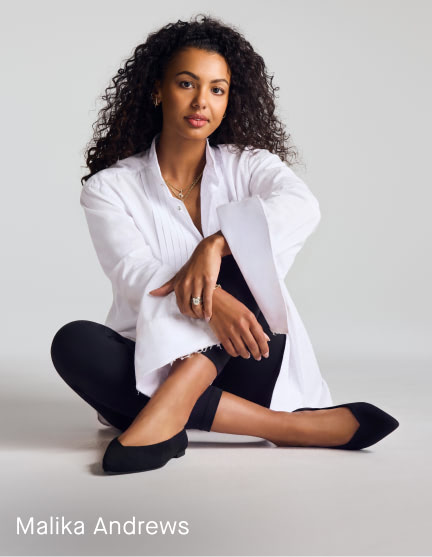
Keep the worn shoe visible inside a portrait
Rothy’s official Point of View image shows Malika Andrews seated and wearing pointed flats. The closer foot makes the shoe easy to see within the portrait. The image does not demonstrate comfort or long-term wear.
What to look for: Does the surrounding styling help someone understand the silhouette?
Try this: Capture the complete worn shape before adding detail crops.
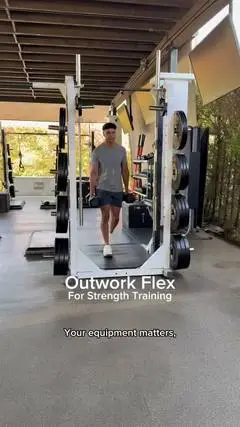
Use the setting to frame the intended activity
The retained NOBULL still places footwear in a training setting. The environment supplies activity context, but a still cannot establish movement, grip, fit or performance.
What to look for: Which product feature needs a separate clear view?
Try this: Show the exact model and construction detail with your own sample, and source any performance claim separately.
A shoe ad can sell an outfit, introduce a shape or explain a use. We compare those jobs before choosing the crop, movement and words your next footwear creative needs.
Choose the footwear question first
The same shoe can appear in a fashion portrait, a detail-led product image or a movement demonstration. A viewer might want to understand its silhouette, how it looks with an outfit or how it behaves in a specific activity. Pick 1 primary question before choosing a reference.
Rothy's gives us a worn pointed-flat view. NOBULL gives us a training setting. Use the difference to choose what your photo needs to explain: styling, shape or a feature in use. Neither still can confirm comfort, fit, durability or results.
Make the shoe recognizable in the whole composition
Rothy's keeps both shoes in the portrait and brings one foot closer to the camera. That makes the pointed shape and opening easier to see. For a worn product shot, decide which detail the pose should bring forward before choosing a tighter crop.
When briefing a worn product shot, specify what must remain visible: the toe shape, heel, opening, fastening or relationship to the trouser hem. A stylish pose can hide the detail the customer needs. Start with a whole view, then add a closer view only if it answers another question. A crop is useful when it adds information, not simply because it makes a second image.
A training setting does not prove performance
The retained NOBULL training frame shows a person among gym equipment with footwear visible near the lower center. Its text names a training context. The equipment and body position tell us where the product is being presented. They do not prove a training benefit or explain every shoe feature.
For your own activity-led concept, plan the action that makes the relevant detail readable. A walk across the frame, a step onto a surface and a static side profile show different things. Keep the actual shoe model consistent across the sequence. If the copy names grip, support or another functional benefit, obtain the relevant evidence rather than expecting a workout scene to substantiate it.
Separate the worn view from the detail view
Give the whole shoe and the detail different jobs. The worn view shows how it looks with the outfit. The close view shows the feature you're discussing. Connect the shots so someone can find that detail on the same shoe.
Write a shot pair rather than an unstructured request for more coverage. For example: a full seated styling view followed by a close view of the toe and opening, using the same shoe and outfit. Record camera position, foot placement and the detail that must stay unobstructed. The editor then knows why the second shot exists and where it belongs in the sequence.
A shoe-ad brief
Our brief is for a shoe ad. Check the real product’s design and specifications before filming. The opening shows the pair worn with the same outfit. The body moves to a side view and an overhead view so the viewer can identify shape and opening. The closing frame returns to the worn view with 'See the shape and sizing details.'
The script deliberately avoids a comfort testimonial or a universal-fit promise. The product owner must provide the real model, available sizing information and approved product facts before production. The producer checks that the pose does not hide the toe or heel. The editor checks that the detail views connect clearly to the whole product rather than suggesting a different model.
Choose a contrast that changes the creative idea
Compare a styling-led explanation with a feature-led explanation. In the first, the question is how the footwear works with an outfit. In the second, the question is what a particular design detail looks like. Changing the background or the same caption's type size within 1 concept is a variation, not a new explanation.
When reviewing the references, record the role of the shoe, person, environment and copy separately. That makes it easier to decide what to use in your own brief. You might borrow the idea of keeping a shoe's opening visible while choosing entirely different styling, framing and language for your own product. The reference stays evidence for the observation, not permission to reproduce the campaign.
Review the exact export and product handoff
Look at the finished creative at its intended size. Can someone still see the feature the line names? Does a platform crop hide the heel or cut across the shoe? Is the final product shown the same one the destination describes? Review these questions on the actual export rather than relying on a desktop design file.
Use the worksheet to turn the reference into a shot list. Name the view, product detail and fact someone needs to check. Keep those decisions beside the image so the team knows what to make next.
Use the worksheet
The completed example separates what we can see in the ads from our own plan. Use the blank worksheet for your product details, supporting sources and the people reviewing the work.
Start with the blank worksheet, or read the filled-in example to see how to use it. You can copy either one.