AdSpy and Barry: build an ad shortlist you can explain
Compare how you'd search for ads, save references and use them in a brief. Those steps matter more than the length of a feature list.
AdSpy search and our visual research workflow
AdSpy describes a searchable Facebook and Instagram ad database. Its official site lists ad-text, URL, page-name and comment search, plus filters including media type, dates and affiliate details. These are vendor descriptions checked October 18, 2026; we have not tested an account or compared database coverage.
- You know a phrase or advertiser
- Evaluate AdSpy’s described text, page-name and URL search against the exact query you need. Check the source record and dates before treating a result as current.
- You want a visual approach
- Use our visual search and format filters to explore references, then open the creative and explain why it belongs in the shortlist. A relevant image does not establish audience, spend or results.
- You need a production handoff
- Keep the source, visible observation, proposed adaptation and unanswered questions together. Save the references in a board and give the next owner an original brief.
Choose by the research question and check the tools against your own sample. We do not claim broader coverage, better accuracy or lower cost than AdSpy. The existing local controls demo below shows a small practice fixture, not a live comparison of the two services.
Use AdSpy for the research task its data can answer
AdSpy’s site describes searching Facebook and Instagram ads, including filters and comment search. Its database coverage and update behavior are the vendor’s claims; we have not tested a paid account. Open the official product if that is what you are seeking. This guide gives a different output: an explainable shortlist for a production brief.
Ask an evaluation to return one specific advertiser or product question, then inspect source identity, time range, creative completeness and what each field means. A positive comment is not verified sales evidence, and a long-running creative is not automatically profitable. Keep observed execution, advertiser claim and your interpretation in separate columns.
Which AdSpy is this?
This page concerns adspy.com, whose official site describes ad-text, URL/page, advertiser, media, date, likes, comments and affiliate-related filters. It does not concern another product using the AdSpy name. These are current vendor descriptions. No AdSpy account query or returned sample was tested.
AdSpy describes a searchable Facebook and Instagram ad database. We help you organize creative references. Compare how each fits your research: can you find the examples you need, save the source and turn the useful parts into a brief?
Define the sample before searching
If you’re researching how to show a product, choose ads where you can actually see the relevant action. Save the source, date, filters and why you picked each one. Remove duplicates. Skip a clip when the missing footage or audio prevents you from answering the question. Search results aren’t necessarily a complete archive.
Explain why each ad belongs in the shortlist
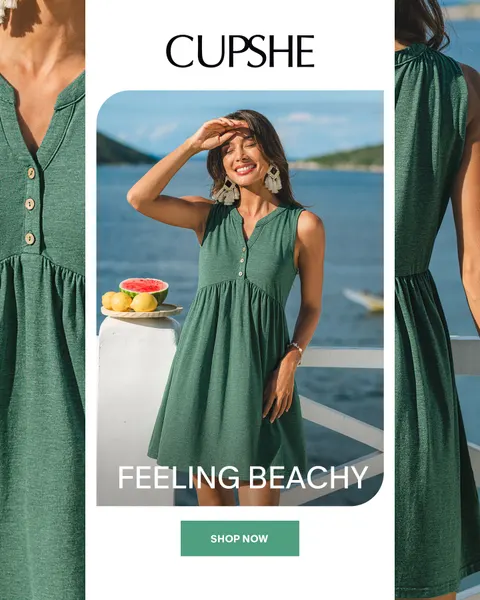
This example uses a Cupshe reference to plan original garment shots. The controls demo uses sample data.
- Sampling question
- How does a complete product-and-person composition read at reduced feed size? This is a visual question, not a winner search.
- Source and sample
- In this local demo, the Lifestyle filter selects the Cupshe image from 3 saved reference records.
- Inclusion rule
- 1 whole image we can inspect, with the matching format label. We haven’t selected a video for a question that would require its full audio.
- Exclusion rule
- Other 2 fixture records are not Lifestyle. This exclusion concerns metadata and task fit, not quality or performance.
- Visible observation
- The main view shows someone wearing the dress, with closer crops at the sides showing its fabric and fastening. The brand sits above and Shop now below. That gives us a layout to discuss, not audience or performance data.
- Handoff decision
- For our own approved garment, assign an original front view showing fit and a separate close view only if it reveals a verified fastening or construction detail. Keep the product version consistent. Choose new language and obtain original production permissions.
Make the shortlist reproducible
In the demo, we filter 3 saved references by Lifestyle, open the Cupshe ad and save it to a board. Board storage and the share link are simulated. This does not show an AdSpy search, our full catalog, semantic ranking or a live account save. Use the worksheet to record where each reference came from and why you selected it.
Carry the observation into an original assignment
Use the reference to explain what you want to show in your own shoot. Write what the ad shows first, then your new idea. Keep the 2 separate so nobody mistakes your plan for something the advertiser did. Likes, comments and time in a library won’t tell you whether the ad made money.
Review the database and handoff separately
Check that the database covers the brands, dates and media you need. Then check that your shortlist explains why you selected each ad and what’s missing. Confirm access limits and billing directly. We haven’t tested completeness, pricing or performance here.
Keep the visible choice beside the assignment
Watch the reference collection controls
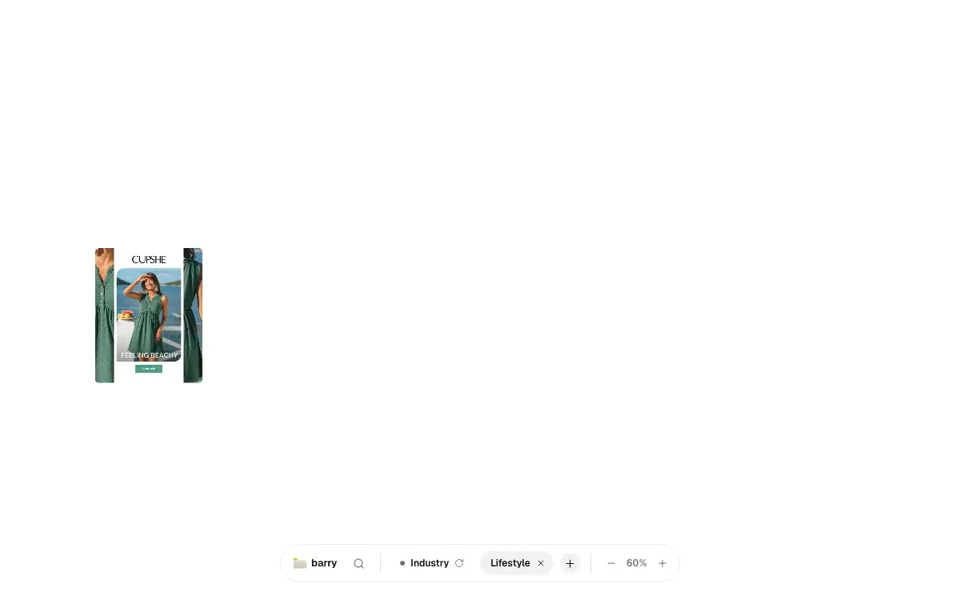
- Apply the retained Lifestyle format filter.
- Open the whole retained Cupshe image and inspect it.
- Close the viewer, hover the reference and press S to open the Save picker.
- Choose the practice board, reopen it through the finder and use Share.
- Carry the observation, limitations and next owner into the worksheet.
Take the handoff into your document
Start with the blank worksheet, or read the filled-in example to see how to use it. You can copy either one.
Questions about this workflow
Does AdSpy show which ads are profitable?
The official page describes discovery filters. No profitability, conversion or completeness evidence was tested for this guide. Engagement or longevity alone cannot establish a business result.
Is the recorded shortlist a live Barry board?
The recording uses our interface with sample data. Saving and sharing are simulated, so it did not create a live board or shared link.
Sources and review scope
We read the official pages on October 14, 2026. Product capabilities are described by their publishers. We did not test vendor accounts, generated output, pricing terms or business results.