Meta Facebook ads: take the reference into production
Use the reference to decide what to shoot, what to say and which placement to prepare for.
Give each reference a production decision
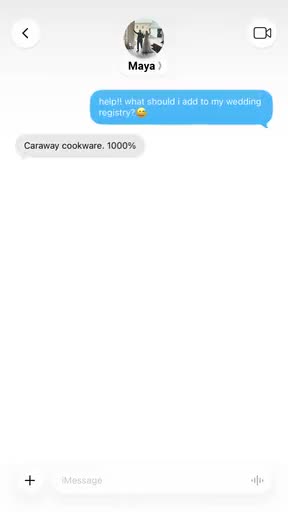
Turn a product-choice question into a concept
Caraway uses a registry question to start a conversation about cookware. The exchange leads to a review-count claim and product link. You can use the question-and-answer structure with your own product, without inventing a recommendation or review count.
What to notice: A wedding-registry question gives the message exchange a task.
Product: Product preview and advertiser statements supply information. The conversation is not verified customer testimony.
Offer: No price or discount is shown.
Next step: A product-link preview provides a destination cue.
Try this: Brief a clearly labelled scripted concept around your own product-choice question. Use no fabricated review count, customer or endorsement.

Translate a concept into required coverage
Blueland moves from a bathroom promise into a tablet demonstration. The steps make the idea clear. If you brief this approach for your own product, list the actions you need to film rather than asking for someone to hold it.
What to notice: Bathroom setting and text introduce an aspiration.
Product: Tablet, bowl, fizzing, brushing and flushing make a handling sequence visible.
Offer: No price or discount is shown.
Next step: A written invitation closes the sequence.
Try this: For your own product, turn the concept into an ordered coverage list and separately review the promise. Do not copy efficacy or sensory wording without evidence.
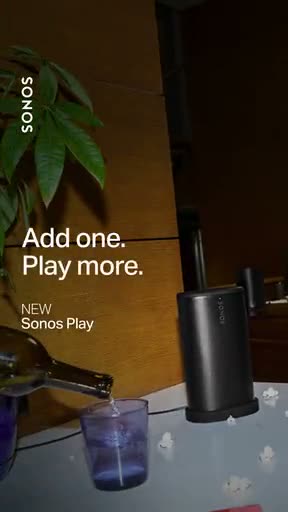
Brief the quieter alternative
Sonos holds on the product while the words appear beside it. That keeps attention on the product and words without adding a new action in every shot.
What to notice: A whole speaker starts the sequence.
Product: The room supplies context. Silent imagery does not demonstrate sound quality.
Offer: A new-product label appears, with no price or discount.
Next step: No explicit shopping button is visible.
Try this: Create a separate product-introduction concept using your own object, approved message and destination. Do not call a crop of the demonstration a new concept.

Specify what each detail crop must add
Cupshe places a central wearing view beside garment-detail crops. A Meta handoff can borrow the coverage question without assuming the original Feed, Story or Reels placement.
What to notice: A central dress view and supporting crops are visible together.
Product: Different distances make garment areas inspectable.
Offer: No promotional offer is established by this composition study.
Next step: No closing sequence is established by this still.
Try this: For your own garment, commission a whole wearing view and named construction details. Check intended export and interface separately.
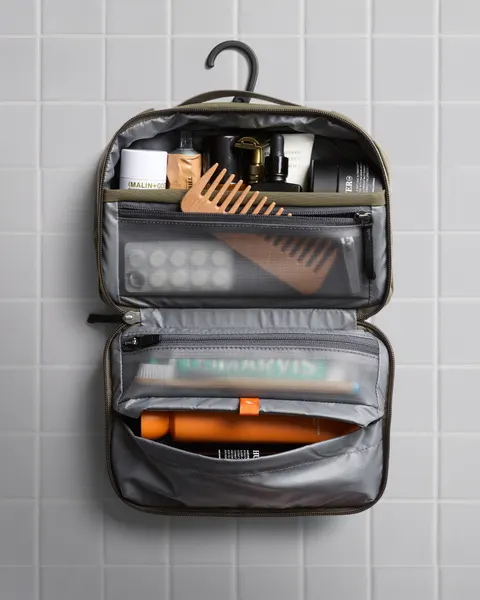
Make the product question inspectable in 1 frame
Bellroy opens a hanging toiletry bag so viewers can see the compartments and contents. Use that view to decide what your own product shot needs to show.
What to notice: An opened bag makes the layout visible.
Product: Contents and compartments can be inspected in the whole still.
Offer: No promotional offer is established by this study.
Next step: No closing sequence is established by this still.
Try this: For your own product, name the exact contents and required open view. Verify fit on the real sample. Do not borrow an unsupported capacity claim.
A Meta Facebook ad brief should explain what to make and why. Compare a question-led conversation, a demonstration, a product introduction and static detail studies, then carry the useful decisions into production.
Where to open Meta Ads Manager
Meta Ads Manager, Facebook Ads Manager and the generic ads manager query can point to the same Meta campaign tool. Start at Meta’s official Ads Manager page using the source link below. Its Go to Ads Manager button leads to Meta’s account-entry flow. We read the public page on October 18, 2026. We did not sign in, create an account or operate a campaign.
Use the business identity that has permission for the intended ad account. Before changing a campaign, check the account and business you are acting for. If the expected account is unavailable, ask its owner to confirm access and use Meta’s current help. Do not create a duplicate account or add billing details just to get past an access problem. Private account screens were not tested.
Choose the tool for the job
Use Ads Manager to create, manage and report on your own campaigns. Use the public Meta Ad Library to research ads and their available disclosures. Use Meta Business Suite for the publishing, inbox and business activities described on its current product page. Opening a public competitor reference does not give access to that advertiser’s campaigns.
If you came here to log in, follow the official Ads Manager source link. Our guide explains the creative and review decisions around the tool. We do not host Meta account access, place bids or read your campaign data. Keep a reference’s visible idea separate from a claim about its audience or results.
Choose the question, then the concept
Caraway organizes a product choice as a conversation. Blueland turns an aspiration into a task. Sonos holds a product beside a short message. Choose the question your own creative must answer before selecting the structure. Use the reference to discuss a creative choice. It cannot tell us who the advertiser targeted or how the ad performed.
Turn a choice into a coverage list
Turn the reference into a shot list. Cupshe needs a wearing view and useful details. Bellroy needs the bag open. Blueland needs the steps of the demonstration. Tell the producer what to capture and which product facts still need checking. Sending an ad link won’t answer those questions.
Keep concept changes separate from export changes
A conversation and a demonstration are different ways to explain the product. Cropping the same demonstration for another placement changes the export. Record both choices, then check the current specs and placement preview. The shape of a reference alone doesn’t tell us where it ran.
Send the accepted version to the buyer
The pouch example below gives the team 1 product question, the shots to film, a matching destination and 2 openings to compare. The creative lead reviews the complete exports and identifies the accepted version. The buyer then verifies actual placement, identity, campaign setup and measurement. Keep unresolved inputs attached so a proposed script is not mistaken for a launched campaign.
How to run Facebook ads: prepare the account and destination
To run a Facebook ad, you need an ad account, an appropriate business identity, a working destination and a reviewed plan for what you will spend. Meta’s campaign guide says an account and payment method are needed before first publication. Use the official account setup in Meta, with the business owner responsible for access and billing. We have not created an account, added a payment method or run an ad for this guide.
Before entering the campaign flow, prepare the final creative, approved words, destination and review owner. Open the destination on a phone and confirm that it does what the ad promises. A product-details link and a booking form serve different jobs. If you cannot verify the destination, keep the work in draft. The creative references above help you prepare the material; their unknown targeting and results are not campaign settings to copy.
Create the campaign and choose the advertising goal
In the desktop Meta Ads Manager flow, select Create, choose the buying type and campaign objective, then continue. Meta’s campaign guide describes Auction and a separate Reservation workflow. Choose the route appropriate to your plan instead of assuming all accounts show the same options. Name the campaign so the owner can identify the product, goal and period.
Review whether the budget belongs at campaign or ad-set level and whether a Special Ad Category applies. Use the approved amount and schedule, and read the account’s current budget information before publishing. The available options depend on the objective and account. This guide does not recommend a spend amount, promise a hard daily cap or establish that conversion measurement has been configured.
Set the audience, placements and schedule at ad-set level
Meta describes the ad set as the level where audience, placements and schedule are defined, with budget controls depending on the chosen setup. Record who should see the ad, where it can appear and when it should run. If your plan is specifically for Facebook, inspect the selected placements rather than treating an ad made in Meta Ads Manager as Facebook-only.
For this product brief, the creative question is whether an open-layout view makes the compartments understandable. That question does not supply a targeting audience. The buyer must choose an appropriate audience and confirm the objective, destination and measurement in the actual account. Keep those decisions separate from the shot list so a proposed product-use scene is not mistaken for verified customer research.
Create the ad and inspect each placement preview
At ad level, name the creative and select the correct business identity. Meta’s guide distinguishes creating a new ad, using an existing post and using a Creative Hub mockup. For a new single-image or video ad, add the media, text and destination. Other formats have different setup requirements. Review any available automatic creative changes against the version the team approved.
Use the ad preview and advanced preview to inspect the intended placements. Check cropping, readable text, product identification, the CTA and the actual destination. A source image’s shape does not establish where the original ran. If a face, product detail or necessary condition is hidden, revise the asset or placement choice before approving it. Keep the reviewed filename with the ad so an older export is not uploaded by mistake.
Publish only after review, then check delivery
Meta’s publishing guide places Publish after campaign, ad-set and ad review. Publication accepts Meta’s listed advertising terms and submits the ad for review. If you are not ready, keep the work as a draft. The source describes review and delivery statuses separately, so a submitted ad should not be reported as already running.
After publication, inspect the Delivery column and the scheduled start. If an ad is rejected, read the stated reason before editing or requesting another review through the available process. If it is active, verify that the intended creative and destination are in use and record the first actual delivery data. Do not infer sales from approval or an active status. We have not tested a real campaign or publishing action in this guide.
An original launch review for the pouch creative
Our practice handoff has 2 opening variants: a whole open layout and a cable in hand. The body and close remain shared. The creative lead supplies the approved exports and words. The buyer records the selected account and identity, objective, audience, placements, budget owner, schedule and destination. Any missing item is an unresolved launch input, not permission to guess.
For the final review, show the preview beside the product page. Ask whether both show the same item and arrangement, whether the action can be followed and whether the close leads to the promised information. Record the file version and reviewer. After a real campaign runs, keep observations and actual results beside the version ID. The practice plan supplies no targeting recommendation, customer claim or forecast.
Official Meta instructions and scope of this walkthrough
We read Meta’s public desktop campaign, advertising-level, ad-creation and publishing guides on October 18, 2026. The normal browser could read the full articles after the text-fetch route returned an access block. We did not bypass a login or open an advertising account. The links below take you to the current official instructions.
This is a source-backed overview connected to an original creative handoff. It does not verify the screens or eligibility in your account, every objective-specific option, payment setup or event tracking. Read the current account controls and linked guidance when you execute. The older source-access blocker is resolved; real-account execution remains untested.
Use the worksheet
The completed example separates what we can see in the ads from our own plan. Use the blank worksheet for your product details, supporting sources and the people reviewing the work.
Start with the blank worksheet, or read the filled-in example to see how to use it. You can copy either one.
Documented sources
Sources and review method
We wrote these notes and briefs from the reference files. The previews here are short and silent. When a note uses a longer video, we say so in the caption. Our suggestions for your own ad are separate from what the advertiser made.
We added these review notes on . That isn’t the date the ad ran or the file was collected. We don’t have the full spoken script, targeting, spend or results unless a source below provides them. A public ad also doesn’t give you permission to reuse it.
Use the IDs below to look up the references in the Meta Ad Library. We haven’t rechecked whether each live record is still available or matches the file shown here. A Meta library ID doesn’t confirm TikTok placement. You can still study the previews on this page.