Cyber Monday ad examples: distinguish the event labels
Cyber Monday, Cyber Week and Cyber Craze are different event names. We compare 3 explicit 2025 Cyber Monday ads with 2 related promotions to help you plan the right message for your own event. The pictured offers are historical.
Compare the creative choices

An explicit Cyber Monday event
MANSCAPED puts Cyber Monday Sale and 25% off sitewide above the products. The offer is easy to spot, with the product range directly below it.

A Cyber Week event label
Fenty Beauty puts 30% off sitewide above up to 60% off selected items, with the products below. Keep the 2 conditions with their percentages when studying the layout.
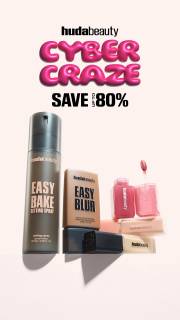
A Cyber Craze offer above the products
Huda Beauty leads with Cyber Craze and Save Up To 80%, then shows the products below. The offer gets most of the attention, with a separate area for the products.

The event written into a reaction headline
NOBULL puts a reaction headline over a portrait: Your face when you can get NOBULL up to 50% off this Cyber Monday. The event is part of the sentence instead of a separate badge. Up to still qualifies the discount, even when the headline is playful.

An extension with an end date
NOBULL places Cyber Monday Extended and Ends 12/3 beside an Up to 50% Off message and a shoe arrangement. The extension and deadline are separate lines, so the image explains both why the offer is still running and when it ends. These are the dates and terms pictured in the 2025 ad.
What to look for: Does the actual event label support a Cyber Monday interpretation?
Try this: Record the approved file, event name, linked page and end date for each version, plus which file it replaces.
Classify the event from explicit evidence
Use the event name the ad actually shows. MANSCAPED says Cyber Monday Sale, Fenty Beauty says Cyber Week is here, and Huda Beauty says Cyber Craze. A seasonal collection date doesn't make them all Monday ads. Keep the source date beside the name when saving a reference.
Separate the main saving from selected-item language
Keep the percentage attached to what it covers. MANSCAPED shows a sitewide offer. Fenty Beauty combines a sitewide offer with an up-to discount on selected items. Huda Beauty leads with a large saving message. Note the wording and conditions, then use your own current terms for a new ad.
Refresh the event without inventing a campaign sequence
Compare what stays familiar when the event changes. MANSCAPED uses a product group and ribbon shapes in both its retained Black Friday and Cyber Monday examples. That can help you plan an update to your own assets. It doesn't establish the order the brand ran them. Specify the product photo you will keep and the event, dates and terms you need to change.
Prepare the Cyber Monday files and terms
List the Monday files, offer, eligible products, landing page and start and end times. Check the image text against the ad copy and destination. Name which earlier files each one replaces and when they need to come down. That gives the team a clear update plan without leaving old event messages running.
For the Monday brief, give the designer the existing product-group photo and wordmark, plus the confirmed Monday event name and terms. Keep those product assets while replacing the weekend heading and offer copy. Give the writer the same Monday details for the ad fields and landing page. Then review the 3 surfaces together to check that the event, eligible products and timing match. List the final file and the weekend version it replaces, including when each should stop appearing. If Monday changes the discount or selection, make that difference visible rather than treating it as a date-only update. This is a file-and-copy plan for review, so it doesn't assume the campaign has been scheduled or published.
Use the worksheet
The completed example separates what we can see in the ads from our own plan. Use the blank worksheet for your product details, supporting sources and the people reviewing the work.
Start with the blank worksheet, or read the filled-in example to see how to use it. You can copy either one.