Black Friday gift-with-purchase ads: show the qualifying action
A free gift needs a clear condition: buy what, or spend how much? We use 2025 Black Friday examples to show how to explain the gift, the purchase and any choices the shopper gets. The pictured offers are historical.
Compare the creative choices
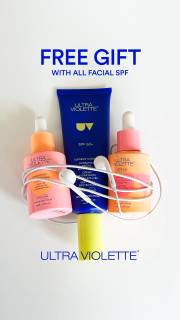
A gift offer with a purchase condition
Ultra Violette puts Free Gift with All Facial SPF above the products. The headline names the purchase that qualifies for the gift.
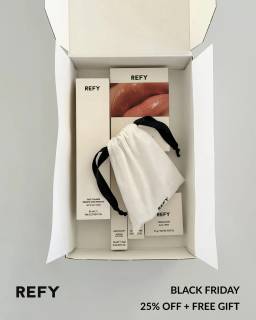
A bonus product made visible
REFY shows the products together in an open box, with Black Friday 25% off plus free gift along the bottom. The gift message sits beside the product photo, though the full purchase conditions need the source terms.
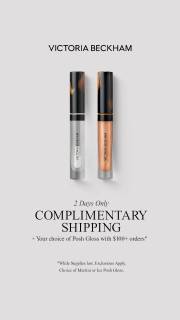
Shipping and the separate gift condition
Victoria Beckham Beauty shows 2 products above Complimentary Shipping. A day-specific qualifier appears above the headline. The smaller condition text needs closer inspection before quoting a threshold. The retained ad text separately describes a choice of gift on orders of $100 or more and shipping on all orders. That threshold applies to the gift.
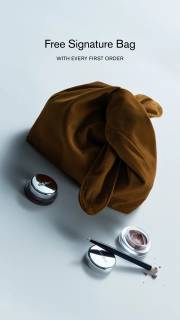
An extra bag beside a purchase invitation
MERIT shows a bag with cosmetics. Free Signature Bag appears above the image, followed by with every first order. The visible condition makes the gift offer specific.
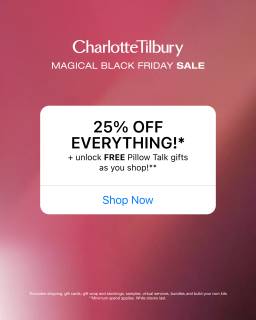
The gift promise underneath the main discount
Charlotte Tilbury puts 25% Off Everything above + unlock FREE Pillow Talk gifts as you shop, with Shop Now below. The gift is an extra reason to shop beneath the main discount. Asterisks mark conditions, but the small terms are not readable enough here to establish the gift threshold or qualifying products.
What to look for: What must the shopper buy to qualify for the extra item?
Try this: Write the gift condition separately from shipping and discount terms. Make clear whether shoppers choose one gift or receive every pictured item.
Give the gift a visible relationship to the purchase
Make it clear which item is the gift and what someone must buy. Ultra Violette names facial SPF in its condition. REFY puts the products beside a discount and free-gift line. For your photo, separate or label the gift if a group shot could make the offer confusing.
Say what the shopper needs to buy or spend
Write the purchase condition as a full sentence before shortening it. Ultra Violette names a product category. Victoria Beckham Beauty's source text describes a Posh Gloss gift on orders of $100 or more. For your offer, confirm the qualifying product or spend, the currency and where the shopper sees the gift added.
Show choice only when the offer actually includes choice
Show whether the shopper chooses a gift or receives every item. Victoria Beckham Beauty's record names a choice of Martini or Ice for Posh Gloss. Its 2 pictured products shouldn't become a promise of 2 gifts. For your ad, state the choice and check how someone selects it on the landing page.
Give shipping and gifts their own terms
Give each benefit its own condition. Victoria Beckham Beauty's shipping offer and threshold gift are separate. REFY pairs a percentage discount with a free gift. Write a line for each benefit before deciding which one leads the ad. Check that someone can explain the gift, shipping and discount rules without mixing them up.
For the notebook-cover offer, write the rule as buying 1 standard cover includes 1 bookmark, chosen from blue or green. Give the designer the cover and both bookmark options, with Choose one beside the options. The 2 colors matter here because the shopper makes a choice, rather than receiving both. Ask the reviewer how many bookmarks come with a cover before showing them the brief. Then check that the planned page asks for a color and adds only that bookmark. Keep the shipping explanation separate from the gift line. If someone expects both options or assumes the cover ships free, revise the wording and spacing around those benefits rather than adding more product photos.
Use the worksheet
The completed example separates what we can see in the ads from our own plan. Use the blank worksheet for your product details, supporting sources and the people reviewing the work.
Start with the blank worksheet, or read the filled-in example to see how to use it. You can copy either one.