Black Friday bundle ads: explain the contents before the value
Before you sell the value of a bundle, show what is in it. We compare 2025 set ads to help you plan the product arrangement, explain the contents and keep any savings claim accurate. The pictured offers are historical.
Compare the creative choices
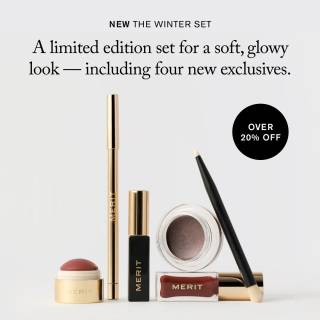
A set presented as a single choice
MERIT shows the products below its limited-edition winter-set description, with an Over 20% Off badge. The wording applies to that set rather than a sitewide offer.
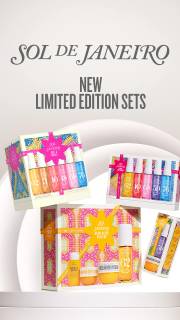
Gift sets as the product story
Sol de Janeiro arranges boxed sets beneath New Limited Edition Sets. The visible message concerns seasonal products, without a readable Black Friday or discount claim.
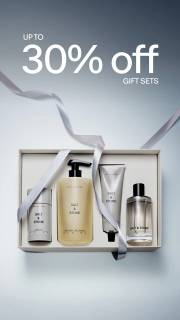
A grouped set with a value message
SALT & STONE puts Up to 30% Off Gift Sets above the product group and open box. The wording ties the saving to gift sets.
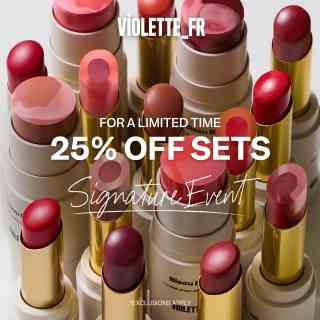
Products grouped into a set
Violette fills the frame with open lip products and places 25% Off Sets at the center. For a Limited Time appears above, keeping both the product restriction and timing cue visible.
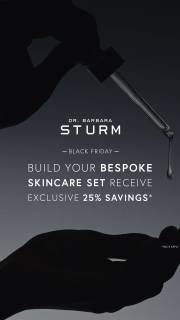
A skincare set against the sale message
Dr. Barbara Sturm makes the skincare set the main message. Exclusive 25% savings appears in smaller type below.
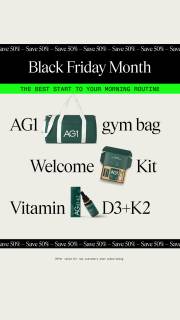
Included items separated into a list
AG1 puts Black Friday Month above a separate list naming a gym bag, welcome kit and vitamin product. Product images break up the list, making the included items easier to identify.
What to look for: Can the shopper identify what belongs to the set?
Try this: Show every included item clearly, then check the list against your product page. Keep props separate from bundle contents.
Count what the image promises to include
Check what the group photo appears to include. MERIT names a Winter Set, Sol de Janeiro shows several sets, and SALT & STONE shows a boxed arrangement. Those aren't all 1 bundle. For your image, start with the actual contents list and make sure props or nearby products don't look included.
Distinguish a collection of sets from 1 set
Say whether you're selling 1 set or a choice of sets. Sol de Janeiro's limited-edition sets headline introduces several options. MERIT names a particular Winter Set. Use the headline, spacing and labels to make your own shopping choice clear, then show the same set or range on the landing page.
Keep savings claims separate from item recognition
Check the contents before adding the savings message. MERIT says over 20% off, SALT & STONE says up to 30% off gift sets, and Violette says 25% off sets. Keep those qualifiers with the numbers. Your product arrangement should still explain what is included when the discount text is covered.
Start with a list of everything in the bundle
List every included item, size and quantity before the shoot. Mark any tray, ribbon or box that is only a prop. Check the list against the product page, then capture a view where people can identify all the contents. That gives the photographer a clear job beyond making the set look good.
For the bundle brief, give the photographer the contents list: 1 notebook, 2 pens and 1 page marker. Ask for a view where all 4 items are separate enough to count, followed by a view in the paper sleeve. Mark the fabric mat as a prop in the brief so the writer and designer don't include it in the offer. Put the 4-item list beside the first layout and compare it with the planned product page. Ask a reviewer to name what they would receive. If they include the mat or miss a pen, change the arrangement or label before adding decoration. This exercise provides no individual prices for a savings claim.
Use the worksheet
The completed example separates what we can see in the ads from our own plan. Use the blank worksheet for your product details, supporting sources and the people reviewing the work.
Start with the blank worksheet, or read the filled-in example to see how to use it. You can copy either one.
Documented sources
- MERIT · Meta Ad Library record 1104584794862560
- Sol de Janeiro · Meta Ad Library record 1464698174634960
- SALT & STONE · Meta Ad Library record 1766003591456536
- Violette · Meta Ad Library record 1393887152407063
- Dr. Barbara Sturm · Meta Ad Library record 1244936997393442
- AG1 · Meta Ad Library record 1130500925870711