Black Friday discount-code ads: connect the code to its rules
A discount code should be easy to read and easy to use. We compare 5 2025 sale ads to help you explain the code, the products it covers and what happens after the click. The pictured offers are historical.
Compare the creative choices

The code beside the sitewide saving
Tatcha puts Exclusive Early Access and Shop 20% off sitewide now with code CYBER25 above the products. The code stays beside the discount so the shopping instruction is easy to follow.
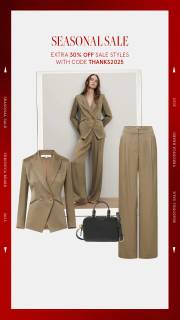
An extra sale reduction with a code
Veronica Beard puts Seasonal Sale above an outfit collage, with a smaller code line below the heading. The code is too small in this still to transcribe confidently.
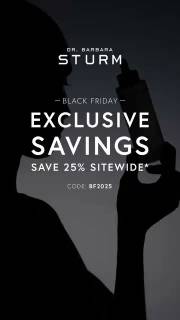
The code directly below the saving
Dr. Barbara Sturm puts Save 25% Sitewide above Code: BF2025 inside a Black Friday message. The code has its own line below the percentage. In this retained video frame, the shopper can connect the saving with the code without searching another part of the image.
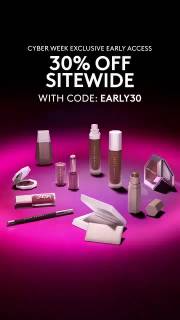
An early-access code above the products
Fenty puts 30% Off Sitewide and With Code: EARLY30 above the products. Cyber Week Exclusive Early Access sits above the percentage. This retained video frame keeps the access message, saving and code together. It does not establish who qualified or how checkout applied the code.
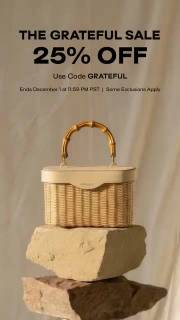
The code sits above the product
CULT GAIA puts Use Code GRATEFUL below 25% Off and above the handbag. The saving and code appear together before the product. This is 1 retained frame from a video-bearing record, so it cannot show how long either line appeared.
What to look for: How does the viewer connect the code to eligible products?
Try this: Use your confirmed code exactly as supplied. Ask someone to read it from the finished ad before they see the brief.
Put the code inside a complete instruction
Tell someone what to buy, which code to use and where to enter it. Tatcha puts code CYBER25 beside its early-access sitewide offer. Veronica Beard pairs a code line with an extra discount on sale styles. Draft the full instruction first, then shorten it without losing the rule.
Explain what receives the extra discount
Name what the code applies to. An extra discount on sale styles is different from a sitewide discount. Check whether your offer covers full-price items, sale items, a collection or a qualifying basket. Note the exclusions before writing a headline so the short version still describes the actual offer.
Review the code as text someone must reproduce
Check the code at the size someone will see it. Ask a reviewer to type it from the export without looking at the brief. Compare every character with the approved code. Keep it readable through any crop or type change, especially when letters and numbers look similar.
Check what happens after the click
Check whether the link applies the code or the shopper must enter it. We can't confirm that behavior from these historical stills. For your offer, follow the approved test path and check the success message and exclusions. A rejected code shouldn't reveal a restriction the ad left out.
The offer uses DESK15 for 3 standard organizer sizes. Give the writer the code, those eligible sizes and the manual-entry instruction together. Ask the designer to place Use code DESK15 below the percentage with enough contrast to read on a phone. During review, hide the brief and have someone type the code from the export. Then compare their characters with the approved string. Follow the planned link and check that it opens the eligible organizers and explains where to enter the code. Use the excluded replacement insert as a review case for the explanation of restrictions. The ad should not suggest that the link applies the discount automatically when this example requires manual entry.
Use the worksheet
The completed example separates what we can see in the ads from our own plan. Use the blank worksheet for your product details, supporting sources and the people reviewing the work.
Start with the blank worksheet, or read the filled-in example to see how to use it. You can copy either one.