Black Friday early-access ads: make eligibility clear
If your Black Friday offer is for subscribers, say subscribers. If it is for members, say members. We look at 2025 early-access ads to show how to explain who can shop, when they can shop and what they need to do next.
Compare the creative choices
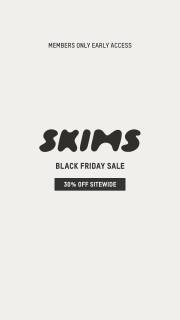
Members-only access and the sitewide offer
SKIMS puts Members Only Early Access above its wordmark and 30% off sitewide. The access rule is part of the main message instead of being left for someone to discover after clicking.

A subscriber invitation beside apparel
Sporty & Rich puts Black Friday and Now Online for Subscribers over the model. The outfit remains visible, while the text explains who can shop.

An invitation to early shopping
Tatcha places an invitation card and envelope beside the products under Unlock Exclusive Black Friday Access. The invitation gives early access a visual idea beyond another discount headline.

Early access with an up-to offer
Violette puts Get Early Access and Up to 25% Off over a close lip image. The photo makes the product category clear while the text carries the access message and offer.

Early access beside the code shoppers need
Tatcha places Exclusive Early Access above Shop 20% off sitewide now with code CYBER25. The access message, discount and code appear together above the skincare products. The frame does not say who qualifies for early access, so that eligibility still needs the source terms.
What to look for: Who qualifies for access, and what can they do next?
Try this: Write who qualifies, when access opens and what they need to do. Add a stock claim only if you can support it separately.
Name who can use the offer
Say who can shop. SKIMS says members, Sporty & Rich says subscribers, and Tatcha uses an invitation. Use your actual rule rather than a vague VIP label. Someone should know whether they qualify before reaching a locked page or checkout.
Show what access changes for the customer
Explain what early access gives someone: an earlier shopping date, a different selection or a specific offer. Violette puts early access beside an up-to discount, but the image doesn't show all its terms. For your own ad, put the benefit beside the condition that unlocks it.
Check the full access journey
Follow the link as an eligible customer. If they need to sign in, check that they return to the right products afterward. If they need a code, show where to use it. A waitlist and an open sale need different calls to action. Make the ad describe the step someone can actually take.
Early access does not mean limited stock
Early access tells people when they can shop. It doesn't tell them stock is running out. Keep any stock claim separate and check it first. To compare creative versions, try a different product view while keeping the access terms the same, then review your own results.
The offer gives newsletter subscribers a 1-day preview. Tell the writer to use subscriber preview because this exercise has no membership system. Give the designer the eligible products and a separate line explaining the code requirement. Then review the path as a subscriber: the ad, the product selection, the code instruction and the point where shopping becomes available. Compare that with the public launch date to check that early means something specific. Keep the product and access line visible on the small export. Check that the code instruction survives the final crop too. If the reviewer thinks anyone can shop immediately, clarify the condition. A sell-out claim doesn't fix that misunderstanding, and this example supplies no stock evidence for one.
Use the worksheet
The completed example separates what we can see in the ads from our own plan. Use the blank worksheet for your product details, supporting sources and the people reviewing the work.
Start with the blank worksheet, or read the filled-in example to see how to use it. You can copy either one.