Black Friday teaser ads: dates, waitlists and announcements
Your sale is coming. What can someone do today? We compare Black Friday 2025 teasers that announce a date, invite people to a waitlist or introduce the event. Use them to plan a clear next step before your own sale opens. The pictured offers are historical.
Compare the creative choices
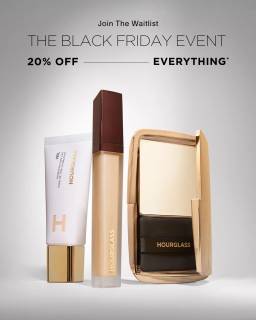
A coming event and waitlist action
Hourglass places its Black Friday event and 20% off everything message above a few upright makeup products. Join the Waitlist remains at the top, connecting the discount announcement with an access action.
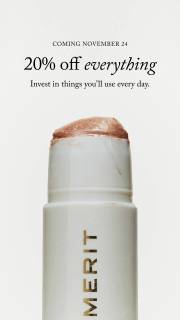
A coming date beside the product
MERIT puts Coming November 24 above 20% off everything and a product close-up. The date tells someone when to return, while the product shows what the announcement is about.

The event name within the brand world
Represent overlays its name and Black Friday wording near the bottom of a store-interior photograph. The retail setting carries most of the frame. Small lower text should be checked before quoting details.
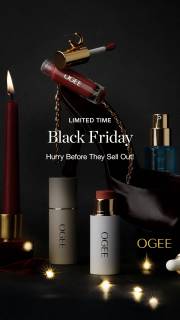
A product arrangement around an urgency message
OGEE places products around a central Black Friday message. Hurry Before They Sell Out adds urgency, with no numerical discount shown.
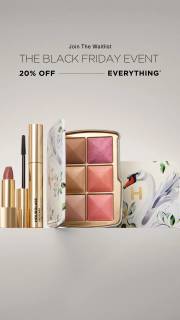
A waitlist action before the offer
Hourglass puts Join the Waitlist above its Black Friday event and 20% off everything wording, with products below. The layout gives the action, offer and products their own space.
What to look for: What action is available before the sale opens?
Try this: Write the action someone can take before your sale opens, then check that the linked page lets them do it.
Choose the action available before launch
Decide what someone can do before the sale starts. Hourglass asks people to join a waitlist. MERIT announces a date. Represent names the event. Your teaser might invite a signup, show the upcoming products or tell people when to return. Match the button and landing page to that action.
Use the product to make the announcement concrete
Show enough of the product for someone to know why they might return. MERIT pairs its date with a product close-up. Represent uses its store setting. For your ad, choose the product or collection detail people need to recognize. Keep the reveal tied to what will actually be available.
Resolve the difference between a waitlist and access
Explain what joining the waitlist means. It might mean receiving an announcement, not early access or reserved stock. Put the promised update and confirmed dates in the signup flow. Only promise priority shopping if your offer includes it. We can't tell how Hourglass handled its emails from the still.
Plan the ad that replaces the teaser
Plan the launch ad alongside the teaser. Keep the product, offer and date consistent, then change the action when shopping opens. Check both landing-page states. If the date changes, update the teaser too. Name who will confirm the dates and replace the files.
For the product teaser, give the writer the confirmed Friday opening date and the selected colors before drafting the headline. The prelaunch link should let someone view those colors or use the existing interest form. Ask the designer to keep the product photo for the launch version, with space to change the action when shopping opens. Put both versions beside their intended pages during review. Can someone tell what they can do today and what changes on Friday? Make sure the signup text doesn't promise priority stock or a discount that the example doesn't include. If the opening date moves, identify both the teaser file and page copy that would need an update.
Use the worksheet
The completed example separates what we can see in the ads from our own plan. Use the blank worksheet for your product details, supporting sources and the people reviewing the work.