Black Friday campaign ideas: plan the creative sequence
Plan the teaser, launch ad and reminder together so each one has something useful to say. These separate 2025 examples can help you decide what goes in each. They don't show one brand's complete campaign.
Compare the creative choices
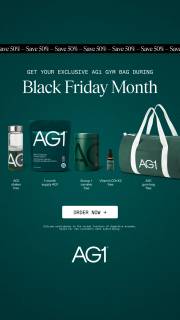
A month-long event above the product lineup
AG1 puts Black Friday Month above its products and bag, with an order button nearby. The event name explains the sale window before the viewer reaches the product lineup.
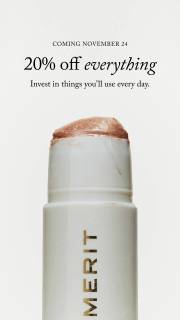
A coming date beside the product
MERIT puts Coming November 24 above 20% off everything and a product close-up. The date tells someone when to return, while the product shows what the announcement is about.
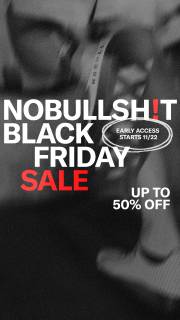
A sale headline over a close torso crop
NOBULL makes Black Friday Sale the main message over a close crop with a measuring tape. Early access gets a smaller date badge, and Up to 50% Off sits below. Notice how the event, date and discount each have their own place.

An explicit Cyber Monday event
MANSCAPED puts Cyber Monday Sale and 25% off sitewide above the products. The offer is easy to spot, with the product range directly below it.
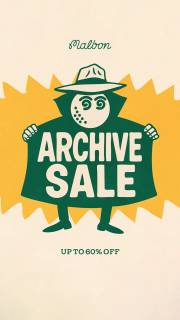
An event message in a brand setting
Malbon gives its illustrated character and Archive Sale lettering most of the frame. Up to 60% off sits below. The brand graphic leads rather than an individual product.
What to look for: What job could this message perform within a campaign?
Try this: List the confirmed dates for your announcement, early access, main sale and any later offer. Include only the stages your own campaign needs.
Assign each stage a different information job
Give each ad a job. AG1 names a month-long event, MERIT gives a coming date, NOBULL mentions early access and MANSCAPED names Cyber Monday. These are separate advertisers, not stages from 1 campaign. Use them to decide what your teaser, launch ad and later reminder each need to say.
Choose a consistent promise before changing the pictures
Keep the product and offer easy to follow as the campaign changes. An announcement can become a shopping message without making it look like a different sale. Malbon's Archive Sale puts a named assortment at the center. Decide whether you're promoting selected products, a collection or a broader sale, then keep that clear across the ads.
Put the dates and access rules on the calendar
For each ad, note the start date, eligible shoppers, included products and end date. Explain any account or code requirement before asking people to shop. Check the Monday offer separately if it changes after the weekend. Give the person confirming those details a place in the brief.
Test 1 creative choice at a time
Pick 1 creative difference to compare. For an assortment sale, try a group photo against a single-product photo with the same offer. For early access, try the eligibility message alone and beside the product. Check the finished images and landing page, then compare your own results.
In the notebook campaign below, ask the writer for 3 messages: which notebooks will be included, when the confirmed offer opens and when it ends. Give the designer the same eligible products for all 3. That lets the announcement become a shopping ad and then a final reminder without changing what the sale appears to cover. Keep the single-notebook and 3-notebook comparison inside the same stage, with the same offer text. Before making exports, lay the messages out in date order and follow each link. Check that the right products and terms are available at that point. Remove an extra stage if the campaign has no real message or action for it.
Use the worksheet
The completed example separates what we can see in the ads from our own plan. Use the blank worksheet for your product details, supporting sources and the people reviewing the work.
Start with the blank worksheet, or read the filled-in example to see how to use it. You can copy either one.