Atria and Barry: choose around the brief you need
Compare how Atria and Barry help you find and organize ad references. Start with the work you need to do, then check which features fit.
Barry or Atria? Compare the task first
Start with what your next brief needs. A useful reference shortlist and an account-performance readout answer different questions.
| Your task | Barry | Atria’s stated workflow |
|---|---|---|
| Collect references for a brief | We help you explore creatives on the Infinity Board, save a shortlist and share a board. | Atria describes competitor research alongside connected brand and account analysis. |
| Understand your own ad results | We help you research creative references. Use your own account reporting to judge results. | Atria describes analysis of your ads and data through Raya. |
| Prepare the next creative | We provide the editable briefing worksheet below to help you turn your shortlist into a brief. | Atria describes briefs and generated ads based on your data. |
| Send assets to Meta | We focus this guide on references and the production handoff. | Atria describes batch uploads to Meta. |
Choose Barry when you need a visual research board your team can explore and discuss.
Evaluate Atria when the next task needs connected account analysis, creative generation or Meta uploads. Confirm the exact plan, connectors and permissions with the vendor.
Using both? Carry the reference shortlist into your briefing process and check how your other tools accept it. We do not claim a native integration with Atria.
Atria describes a system for researching, making and reviewing ads with Raya. We help you find and organize ad references. Start with the job you need done: are you looking for ideas, or trying to understand your own ad results?
Check which Atria workflow you need
Atria’s current public site describes an advertising workflow involving research, AI assistance and Meta creative production. Use its official site for product access and current feature details. Our comparison helps you prepare a brief and distinguish reference research from work requiring your own brand and account data; it does not provide an Atria account.
Before a product evaluation, bring one approved product brief and ask what input each output uses, whether a source can be traced, who can approve an export, and what action can publish or spend. Inspect the actual result against product facts and the brief. A vendor’s winning-ad language does not establish how your next campaign will perform.
Which Atria is this?
We’re comparing Atria, the advertising platform at tryatria.com. The vendor’s current homepage describes brand/ad-data analysis, competitor and customer context, briefs, creative generation and Meta batch uploads. These are dated vendor descriptions, not results from a hands-on account test.
Choose the input your decision needs
If you need ideas for showing a product, start with the ads and note what’s useful. If you need to know which idea earns more revenue in your account, you need your own reporting and a suitable test. We help with the reference research. Atria describes connected-data workflows, but we haven’t tested its integrations or whether it could replace your existing tools.
Turn the reference shortlist into a creative brief
This example uses our pouch. It shows the decisions and approvals the team would need before filming.
- Visible reference observation
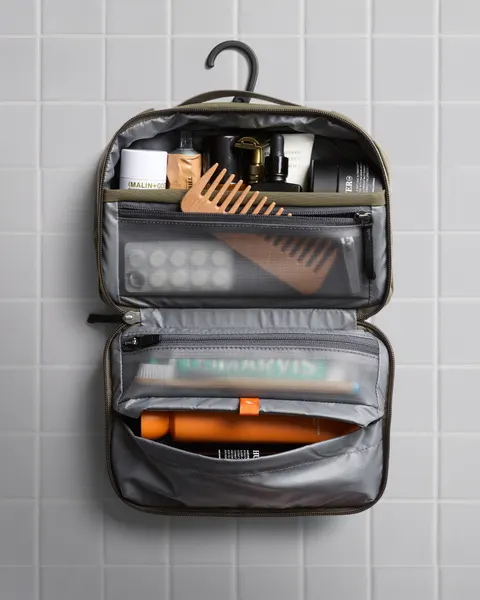
- Bellroy image ID1039604464890055 shows the open bag and its compartments. We can use the layout as a reference, but we haven’t confirmed current delivery, targeting, results or permission to reuse the image.
- Owned metric needed
- To choose an opening by results, use your own experiment and agreed business metric. Public ad references won’t supply those numbers.
- Proposed brief decision
- Film the same 3 named props, keep layout visible, and retrieve the cable continuously. This is an original production hypothesis.
- Approver
- Product owner confirms actual construction and prop fit. Creative lead approves explanation and continuity. Buyer approves experiment/readout basis.
- Next artifact
- A brief with a 6-frame shot plan and a list of approvals still needed. If the account data is missing, leave the test decision open.
Work the same brief question
Our brief asks the team to show 3 items going into a pouch, then take 1 out in a continuous shot. Bellroy’s reference gives us an idea for showing the layout. It doesn’t tell us whether people want our product or which opening would sell more. The worksheet keeps the idea and those unanswered questions together.
Move from collection to approval
Save a few useful references and explain what you want to take from each. Add the real product facts, shots and people approving the work. By the end, the crew should know what to film and which questions still need an answer.
Check fit in your own workspace
Before choosing a connected tool, check which accounts it supports, what data it can access, what it can publish and what your plan includes. Ask about retention and reporting too. For a reference board, check that you can find useful ads and explain the idea to your team. We haven’t compared prices or measured outcomes here.
Keep the visible choice beside the assignment

Watch the reference collection controls
- Apply the retained Lifestyle format filter.
- Open the whole retained Cupshe image and inspect it.
- Close the viewer, hover the reference and press S to open the Save picker.
- Choose the practice board, reopen it through the finder and use Share.
- Carry the observation, limitations and next owner into the worksheet.
Take the handoff into your document
Start with the blank worksheet, or read the filled-in example to see how to use it. You can copy either one.
Questions about this workflow
Does Barry analyze Atria account data?
We show our reference organization controls alongside an original worksheet. We do not claim an integration with Atria or a connected account-analysis service.
Does this prove Raya improves ROAS?
No. The cited homepage describes vendor capabilities. No vendor account, recommendation accuracy, generated output or campaign result was tested for this guide.
Sources and review scope
We checked Atria’s homepage on October 16, 2026. Its capabilities are vendor descriptions. We haven’t tested an account, generated output, pricing or campaign results.