Black Friday product photography: frame products and offers together
Plan the photo and sale message together. These 2025 examples show different ways to arrange the products and leave space for the offer.
Compare the creative choices

A bonus product made visible
REFY shows the products together in an open box, with Black Friday 25% off plus free gift along the bottom. The gift message sits beside the product photo, though the full purchase conditions need the source terms.
A product arrangement around a Black Friday offer
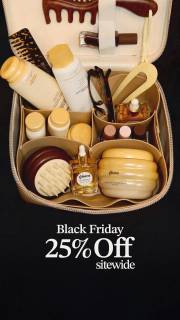
Gisou shows the products together in an open bag above Black Friday 25% off sitewide. The product photo explains what the sale is about before the offer line below it.

Products arranged for inspection
Gisou shows the products in close-up. Black Friday 25% off sitewide sits below, keeping the promotional text separate from the detailed product photograph.

Give one product room around the label
La Prairie centers 1 product with festive foliage around the edges and The Gift of Beauty Wonders above it. The label stays visible because the props sit outside the product. There is no readable discount in the frame. Compare this single-product view with the open bags and sets elsewhere on the page.

Separate the products from the seasonal props
OGEE places products above and below the Black Friday message, with a candle at the left. The products stay separate from the seasonal prop, and the open center gives the offer room. Use the arrangement to plan space for text without assuming every pictured product is included in a set.
What to look for: Which angle or arrangement makes the product easier to inspect?
Try this: Describe the result you need: readable labels, clear product edges and reflections that do not hide details. Let the photographer choose the setup.
Start with the product information the frame must carry
Decide what the product photo needs to explain. REFY shows the contents of an open box. Gisou shows products together in a bag or close arrangement. A close view can show one product clearly while hiding the rest of a set. A wider view can show the set but lose the labels. Choose the view around the information your shopper needs.
Plan product scale before adding promotional type
Sketch the product and text together before the shoot. REFY gives the open box most of the frame and puts the offer below. Gisou also keeps its sale message beneath the products. Plan your own aspect ratio and check the smallest intended size early. Leave enough room for both the product and important terms.
Write visible outcomes into the shot list
Brief the photo you need rather than guessing the equipment behind a reference. Ask for readable labels, clear edges, controlled reflections or space between products. List the arrangement and mark which props are excluded from the order. The photographer can choose the lens and lighting after seeing your actual products.
Check the photo against what shoppers will receive
Compare the photo with the product page before export. Check the included items, sizes and props. Keep the product's shape accurate when resizing. Review the clean image first, then the version with offer text, so you can spot a missing item or covered label without the sale message distracting from it.
For the product photography brief, brief the photographer on the 2 cups before discussing props. Both handles need to be visible, with enough separation to distinguish the rims. Leave space above the cups for the event text. Mark the background cloth as a prop so it doesn't become part of the set description. Ask for accurate product color and product shape, then let the photographer choose how to achieve that with the real items. Compare the clean image with the planned listing before adding the offer. Afterward, check the sale layout at phone size for count, scale and readable terms. If a crop removes a handle or makes the set look incomplete, revise the framing.
Use the worksheet
The completed example separates what we can see in the ads from our own plan. Use the blank worksheet for your product details, supporting sources and the people reviewing the work.
Start with the blank worksheet, or read the filled-in example to see how to use it. You can copy either one.