Black Friday fashion ads: decide between outfit, garment and sale
Choose whether the ad needs to show the whole outfit, the garment or a closer detail. These 2025 examples can help you plan the shot and leave room for your offer.
Compare the creative choices
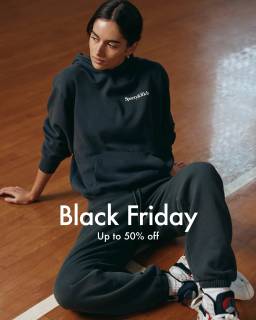
An outfit remains visible beside the offer
Sporty & Rich puts Black Friday and Up to 50% off over a seated model. The outfit stays visible around the short offer.
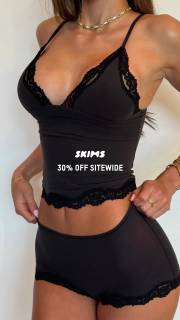
A closer garment view with sale language
SKIMS puts 30% off sitewide at the waist of a close garment view. Most of the frame stays clear for the product.
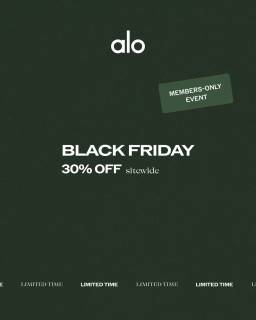
A sitewide offer with members-only access
Alo centers Black Friday and 30% off sitewide, with a members-only label above and Limited Time below. Keep the access rule with the discount when planning your own version.
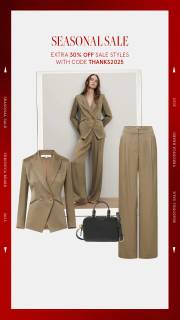
An extra sale reduction with a code
Veronica Beard puts Seasonal Sale above an outfit collage, with a smaller code line below the heading. The code is too small in this still to transcribe confidently.
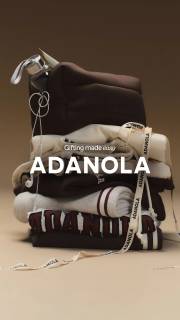
Folded clothing instead of an outfit on a model
Adanola stacks folded clothing and socks on a brown background, with Gifting made easy above the wordmark. This arrangement shows several apparel pieces together without a model, but it cannot show their length or fit during wear. No Black Friday wording or discount is visible in this still.
What to look for: What can the viewer inspect about the garment or outfit?
Try this: Name the garment detail that must stay visible, then check it in every final pose and crop.
Name what the outfit view actually shows
Choose the garment detail the photo needs to show. Sporty & Rich gives more room to the outfit. SKIMS uses a closer view. Your brief might need the whole silhouette, waistband, length or fastening. Name that detail so the photographer can choose a useful pose. These stills don't show fit on other bodies or movement during wear.
Choose which garment owns the composition
Name the main garment and the role of everything around it. Veronica Beard combines a worn coat with product cutouts. For your image, decide whether supporting pieces show styling, alternatives or more sale products. Confirm which items qualify before the layout makes them look like part of the same offer.
Compare product-led and offer-led directions
Compare a garment-led ad with an offer-led ad. Alo gives most of the space to the sale message. Sporty & Rich and SKIMS put the offer over a model. For your garment version, keep the important detail visible. For the sale version, keep enough product information that someone knows what they're shopping for.
Check what each pose and crop leaves visible
Check what the pose and crop hide. A seated shot can lose the hem. A close crop can remove sleeves or shoes. Capture a standing view if the brief needs the whole shape, then add styled views for other details. Review each finished crop against the shot list rather than describing something the image doesn't show.
For the fashion shoot, tell the photographer that the hem, sleeves and open front must be visible in the standing shot. Trousers and shoes provide styling, while the overshirt is the product being promoted. Give the writer that distinction so the headline doesn't imply the full outfit is included. Add a separate close view for the cuff fastening rather than asking the standing image to explain everything. During review, compare each crop with the required details. Reject the seated version if it hides the hem the brief needs. Then check the photographed size and color with the merchandiser and keep the offer in clear space beside the model, away from the garment detail.
Use the worksheet
The completed example separates what we can see in the ads from our own plan. Use the blank worksheet for your product details, supporting sources and the people reviewing the work.
Start with the blank worksheet, or read the filled-in example to see how to use it. You can copy either one.